Extensions
  • Home
  • Add-ons
  • Themes
  • Approval Queue
  • About
  • Upload Extension
  • Sign in
  • BLENDER.ORG

    • Download

      Get the latest Blender, older versions, or experimental builds.

    • What's New

      Stay up-to-date with the new features in the latest Blender releases.

    DEVELOPMENT

    • Roadmap

      See which projects are currently being worked on and what's next.

    • Documentation

      Guidelines, release notes and development docs.

    LEARNING & RESOURCES

    • Blender Studio

      Access production assets and knowledge from the open movies.

    • Manual

      Documentation on the usage and features in Blender.

    • Benchmark

      A platform to collect and share results of the Blender Benchmark.

    • Blender Conference

      The yearly event that brings the community together.

    DONATE

    • Development Fund

      Support core development with a monthly contribution.

    • One-time Donations

      Perform a single donation with more payment options available.

All Add-ons

Add-on Per-Camera Resolution
Per-Camera Resolution
Every camera should have its resolution.
Add-on by pioverfour
About What's New Reviews Version History
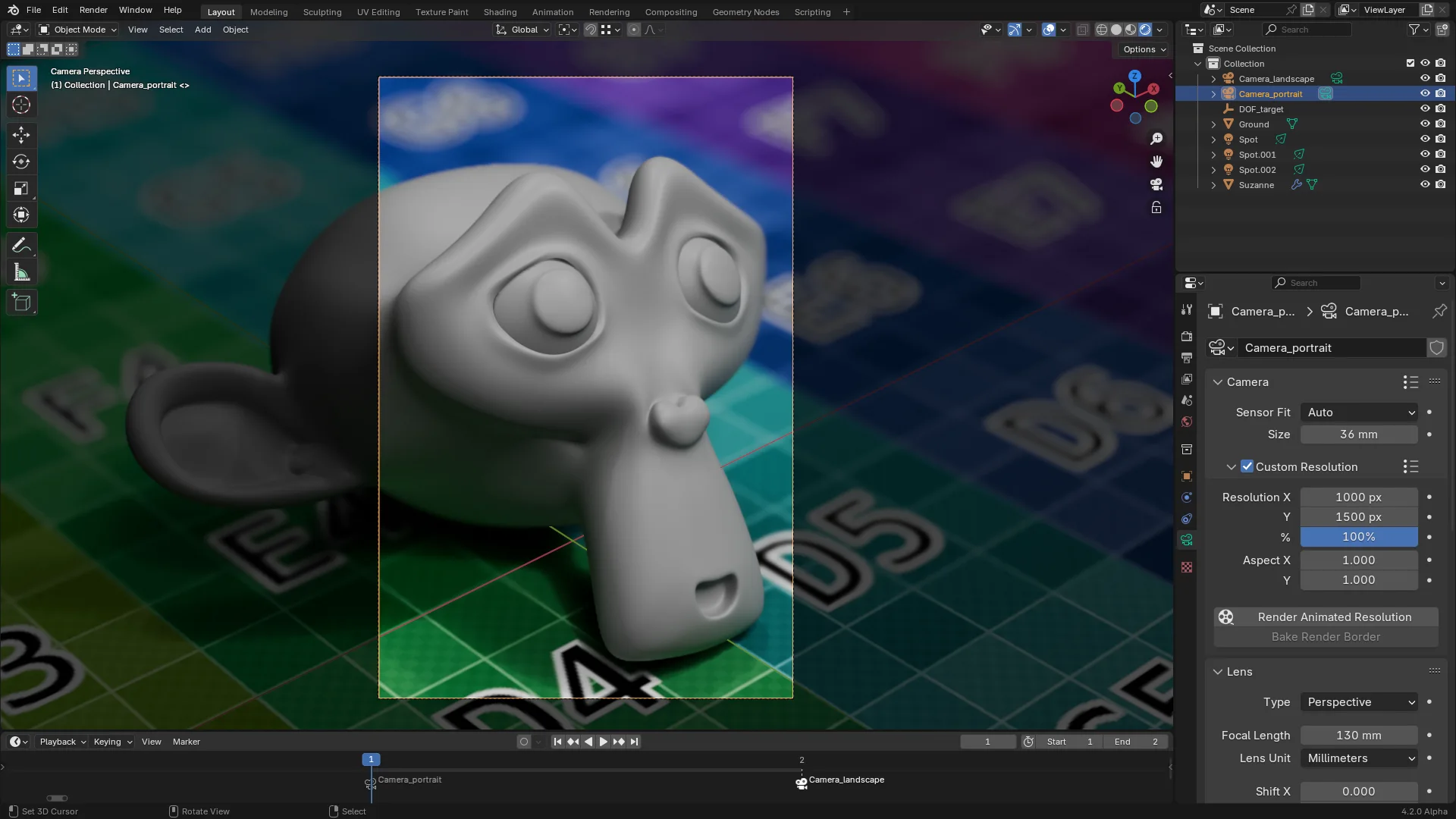
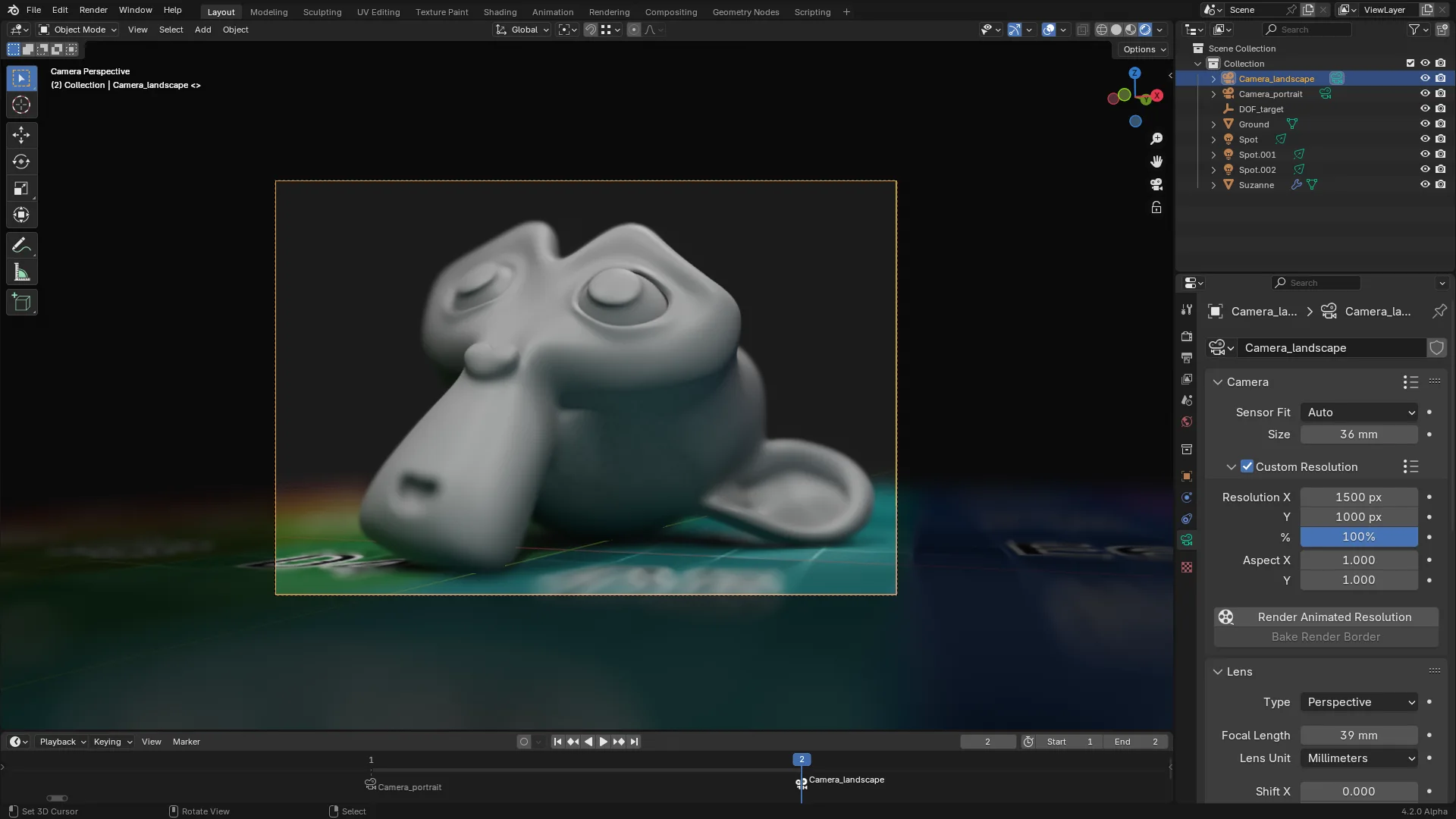
A portrait shot of Suzanne. A custom resolution of 1000×1500px has been selected, and a timeline marker is bound to a first camera. The same scene on frame 2, with another marker to switch cameras. This time a landscape format of 1500×1000px is what we want.

Instead of having a globally-defined scene resolution, this add-on allows you to set a resolution for each camera. Whenever you switch cameras, either manually or through timeline markers, the scene resolution will get updated to the camera’s.

You can find the camera resolution settings in the Object Data properties, under the Camera panel.

Rendering

Animating the resolution is not supported by default in Blender, and regular animation rendering will only use the resolution at render start.
This add-on provides a new Render Animated Resolution operator which works around this limitation. Note however that starting a render this way will lock the interface until the render is complete, or until Blender is killed.

Baking render borders

In addition to providing direct controls for each camera’s resolution, this add-on allows you to create a new camera by setting a render border inside the camera view in the 3D viewport (Ctrl + B), and clicking Bake Render Border in the Custom Resolution panel.
A new camera is created, which uses the exact area defined by the border. This allows you to select multiple cropped areas in a camera.

Known issues

This add-on uses a workaround to animate the camera resolution, which can sometimes cause stability issues. If you encounter such issues, try disabling the add-on.

Translations

The add-on is currently available in English, French, and simplified Chinese. If you’d like to help translate it to your language, please open an issue.

Translators

  • Simplified Chinese: deathblood.

What's New

2.3.2 February 1st, 2026
  • Fix errors when scene camera object is not a camera
  • Improve frame rate by only setting properties when they have changed.

See all versions


Permissions

This extension does not require special permissions.

Developer
pioverfour
Rating
(45)
Version
2.3.2
Updated
4 mo
Published
May 28th, 2024
Downloads
33558
Size
10.9 KB
Compatibility
Blender 4.2 LTS and newer
Website
projects.blender.org/pioverfour/per_camera_resolution
Report Issues
projects.blender.org/pioverfour/per_camera_resolution/issues
License
GNU General Public License v3.0 or later
Scene Camera
...or download and Install from Disk
  • 10.9 KB

Reviews

See all
  • Coverop
  • v2.3.2
  • 1 d

I want to give 5 stars but...

There needs to be an option to make ALL cameras by default have that checkbox enabled "Custom Resolution".

Other than that, SuperB addon!

  • 1P2D
  • v2.3.2
  • 6 d

Brilliant. Should be in Blender by default.

  • ponomarovmax
  • v2.3.2
  • 1 w

Useful extension, helps save time.

5.0

45 reviews
5
4
3
2
1
Rate this Add-on Report an issue
  • About
  • Privacy Policy
  • Terms of Service
About
  • Blender Foundation
  • Blender Institute
  • Blender Studio
  • License
  • Logo & Trademark
  • Credits
  • Privacy Policy
  • Code of Conduct
Organization
  • People
  • Jobs
Blender Network
Download
  • Latest Blender
  • Blender LTS
  • Previous Versions
  • Experimental Builds
  • Source Code
  • Requirements
  • Benchmark
  • Flamenco
Extensions
  • Add-ons
  • Themes
Developers
  • Get Started
  • Roadmap
  • Projects
  • Docs
  • Blog
  • Forum
  • YouTube
  • Python API
Blender Studio
  • Films
  • Training
  • Tools & Pipeline
Support
  • Manual
  • Community
  • FAQ
Get Involved
  • Documentation
  • Education
News
  • Press Releases
  • User Stories
Blender Conference
Follow Blender
Support Blender
  • Donate
  • One-time Donation
Artistic freedom starts with Blender The Free and Open Source 3D Creation Suite