 Quick Studio Light
Version History
1.1.9
Compatibility
Blender
4.2
LTS
and newer
- 88.4 KB
- 1356
-
July 7th, 2026
Changelog
- Added shortcut customization for four main features to the Preferences. Users can now modify the hotkeys to their liking here
- 为首选项添加了四个主要功能的快捷键修改,用户可以在此处修改自己喜好的快捷键
1.1.8
Compatibility
Blender
4.2
LTS
and newer
- 89.0 KB
- 735
-
June 30th, 2026
Changelog
- Fixed keymap handling: the add-on no longer modifies any of Blender's built-in or user shortcuts. It now only registers and removes its own keymaps.
- Improved performance of the rainbow and pulse viewport borders: lowered the redraw rate when the mouse is idle, with no visible change to the animation.
- Internal code cleanup for better maintainability.
- 修复快捷键处理:插件不再修改 Blender 自带或用户的任何快捷键,现在只注册和移除自己的快捷键。
- 优化彩虹/脉冲视口边框性能:鼠标静止时降低重绘频率,动画观感不变。
- 内部代码清理,提升可维护性。
1.1.7
Compatibility
Blender
4.2
LTS
and newer
- 89.0 KB
- 2
-
June 30th, 2026
Changelog
updata
1.1.5
Compatibility
Blender
4.2
LTS
and newer
- 91.9 KB
- 3082
-
May 26th, 2026
Changelog
- Fixed an offset issue between the mouse cursor and the actual light hit point in orthographic camera view.
- Fixed a bug where the light would move closer and closer to the model or gradually become locked to the vertical center when adjusting its position in Precise mode.
- Moved the feature introduction text from the bottom-left to the top of the viewport to match Blender's style.
- In Reflection mode, you can now drag the mouse across viewports to continue lighting. Simply move the mouse from Viewport A to Viewport B; Precise mode remains unchanged.
- Added quick light/shadow linking to the Ctrl+Right-click light panel, with explanatory text at the top.
- Added a reset-to-default button next to material parameter values in the Ctrl+Right-click light panel.
- Replaced the crosshair effect with a new one, as the previous one felt a bit outdated. (Crosshair style inspired by CG Flow's Flow Navigation Lite)
- 修复了正交相机视图中,鼠标光标与实际光照命中点之间的偏移问题。
- 修复了在精确模式中,调整灯光位置时,灯光离模型越来越近或逐渐锁死在上下正中间的BUG。
- 将左下角的功能介绍文本调整到视口顶部,改为Blender的风格。
- 反射模式下,支持鼠标跨视口切换打光,鼠标直接从A视口移动到B视口即可,精确模式保持不变。
- 为ctrl+右键的灯光面板添加了快速灯光/阴影链接添加的功能,在顶部会有解释文本。
- 为ctrl+右键的灯光面板的材质参数值右侧添加了恢复默认值按钮。
- 换了一个新的准星效果,感觉之前的有点土。(准星风格灵感来自CG Flow的Flow Navigation Lite)
1.1.4
Compatibility
Blender
4.2
LTS
and newer
- 92.0 KB
- 520
-
May 22nd, 2026
Changelog
- Fixed an offset issue between the mouse cursor and the actual light hit point in orthographic camera view.
- Fixed a bug where the light would move closer and closer to the model or gradually become locked to the vertical center when adjusting its position in Precise mode.
- Moved the feature introduction text from the bottom-left to the top of the viewport to match Blender's style.
- In Reflection mode, you can now drag the mouse across viewports to continue lighting. Simply move the mouse from Viewport A to Viewport B; Precise mode remains unchanged.
- Added quick light/shadow linking to the Ctrl+Right-click light panel, with explanatory text at the top.
- Added a reset-to-default button next to material parameter values in the Ctrl+Right-click light panel.
- Replaced the crosshair effect with a new one, as the previous one felt a bit outdated. (Crosshair style inspired by CG Flow's Flow Navigation Lite)
- 修复了正交相机视图中,鼠标光标与实际光照命中点之间的偏移问题。
- 修复了在精确模式中,调整灯光位置时,灯光离模型越来越近或逐渐锁死在上下正中间的BUG。
- 将左下角的功能介绍文本调整到视口顶部,改为Blender的风格。
- 反射模式下,支持鼠标跨视口切换打光,鼠标直接从A视口移动到B视口即可,精确模式保持不变。
- 为ctrl+右键的灯光面板添加了快速灯光/阴影链接添加的功能,在顶部会有解释文本。
- 为ctrl+右键的灯光面板的材质参数值右侧添加了恢复默认值按钮。
- 换了一个新的准星效果,感觉之前的有点土。(准星风格灵感来自CG Flow的Flow Navigation Lite)
1.1.3
Compatibility
Blender
4.2
LTS
and newer
- 80.6 KB
- 4231
-
April 1st, 2026
Changelog
Bug Fixes
- Fixed an issue where lights would face the wrong direction when parented to an object
- Fixed Alt + right-click reverse selection not supporting instance objects
- Some other minor fixes that I may have forgotten about, or maybe not.....
问题修复
- 修复当灯光作为某个物体的子级时,会出现反向的问题
- 修复alt+右键反向选择灯光对“实例物体”的支持
- 还有一些我也忘记了的细节的修复,也可能没有.....
1.1.2
Compatibility
Blender
4.2
LTS
and newer
- 77.1 KB
- 5251
-
January 23rd, 2026
Changelog
Light Mirroring
- After selecting a light, mirror it in the Ctrl+Right-Click light panel (supports X/Y/Z axis mirroring)
- Automatically copy and mirror rotation parameters for Softbox node groups
Pulse Border Effect
- Border features a pulsing animation effect
Crosshair Assist Display
- Draws a crosshair to assist with positioning
Geometry Nodes Scene Detection
- Significantly optimizes performance in complex Geometry Nodes scenes
Solo Light Control Point Bug Fix
- Fixes an issue where control points were incorrectly closed when calling up the light panel again after enabling solo light control points
灯光镜像
- 选中灯光后,在Ctrl+右键的灯光面板中镜像灯光(支持沿 X/Y/Z 三轴)
- 自动复制并镜像柔光灯(Softbox)节点的旋转参数
脉冲边框效果
- 边框带有脉冲动画效果
准星辅助显示
- 绘制准星辅助定位
几何节点场景检测
- 大幅优化复杂Geometry Nodes场景卡顿问题
独显灯光操控点问题修复
- 修复在启用独显灯光操控点后,再次呼出灯光面板时操控点被错误关闭的问题
1.1.1
Compatibility
Blender
4.2
LTS
and newer
- 70.3 KB
- 3673
-
December 16th, 2025
Changelog
- 功能补充:“灯光选择”功能,在选择灯光时,添加一个短暂的变色闪烁,以更准确的选择需要的灯光。Alt + 右键连续点击可以切换该范围的其他灯光,直至选中需要的灯光。
- 功能优化:“灯光选择”功能优化对灯光链接的识别,现在能更准确地判断灯光的链接状态。
- Feature Addition: Enhanced the "Light Selection" feature. When selecting a light, it now briefly flickers with a color change for more precise identification. Alt + Right-click continuously to cycle through other lights in the vicinity until the desired one is selected.
- Feature Optimization: Improved the "Light Selection" feature's recognition of light linking. It now more accurately determines the linking status of lights.

1.1.0
Compatibility
Blender
4.2
LTS
and newer
- 67.2 KB
- 1097
-
December 9th, 2025
Changelog
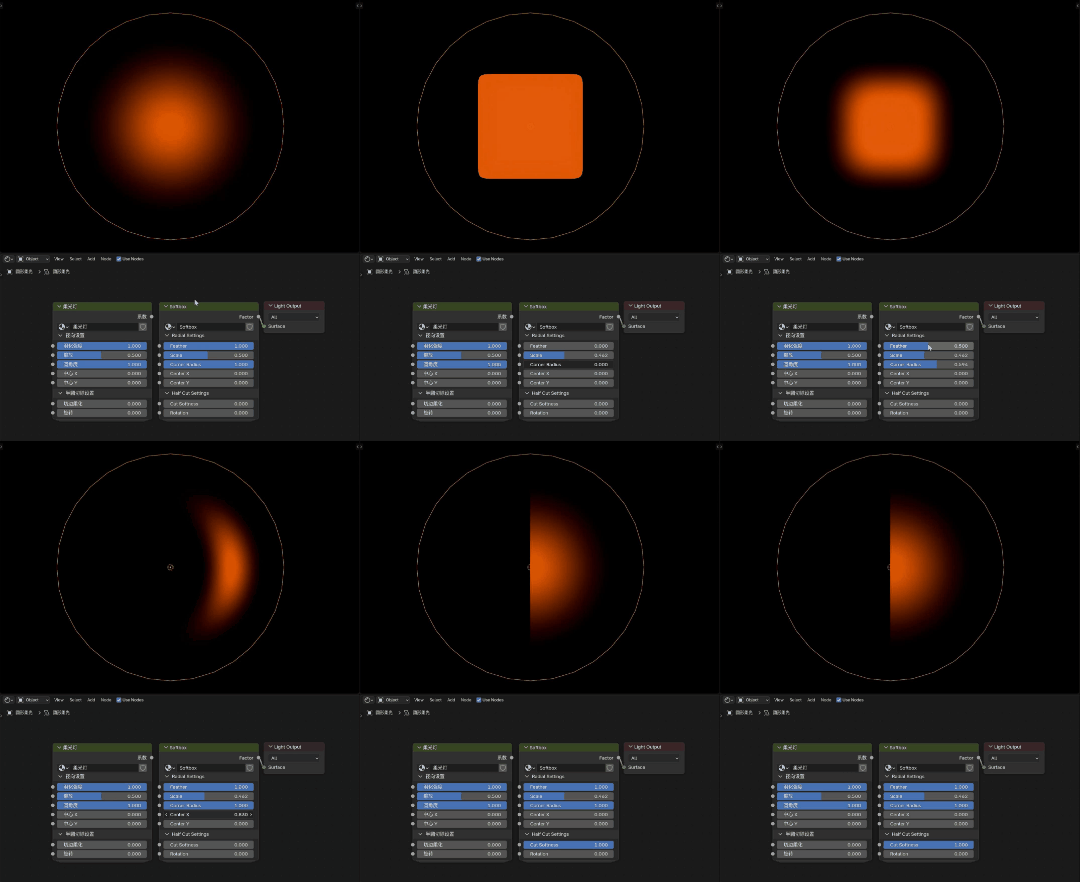
Soft Light Node Group
This update introduces a soft light node group, allowing for easy switching between hard/soft light and circular/square light shapes. The feathering effect for soft light is implemented using a physical formula to achieve a velvety smoothness.
Usage: Select a light, then add the node group via the Shader Editor menu bar's "Add" or the "Shift+A" shortcut.
柔光节点组
本次更新加入了一个柔光灯节点组,可便捷地切换软硬灯光、圆形与方形灯光。软光的羽化效果采用物理公式编写,以实现奶油般的细腻感。
使用方法: 选中灯光后,通过着色编辑器菜单栏的"Add"或快捷键"Shift+A"来添加该节点组。

1.0.9
Compatibility
Blender
4.2
LTS
and newer
- 62.4 KB
- 893
-
December 3rd, 2025
Changelog
This update focuses on performance optimization for the Vulkan backend to achieve performance close to that of OpenGL, and fixes two bugs related to light selection.
本次更新进一步针对 Vulkan 内核优化性能,以实现接近 OpenGL 的性能表现,并修复了选择灯光相关的两个问题。
1.0.8
Compatibility
Blender
4.2
LTS
and newer
- 161.4 KB
- 15
-
December 3rd, 2025
Changelog
This release is identical to version 1.0.9, making it a duplicate release. To roll back, please use version 1.0.7.
该版本与 1.0.9 版本完全相同,是一个重复的版本。如需回退,请使用 1.0.7 版
1.0.7
Compatibility
Blender
4.2
LTS
and newer
- 59.8 KB
- 2109
-
November 20th, 2025
Changelog
Optimizations
- Performance: Enhanced performance and clearer viewport preview effects.
- Multi-selection: Added multi-select functionality for light selection, shortcut key "Shift+Alt+Right Mouse Button", can be enabled in plugin preferences.
- Cyclic Selection: Optimized Alt+Right Mouse light selection - when multiple lights have similar angles, each Alt+Right Mouse click will cycle through these lights.
- Movement Speed: Slightly increased movement speed in precision mode, Shift slow speed remains unchanged.
- Localization: Added Japanese and Korean language support.
Changes
- Preferences: Removed light selection shortcut key settings from preferences, please modify shortcuts in Blender's "Keymap" settings.
- Visual: Removed mouse halo effect as it interferes with light observation.
UI Improvements
- Viewport: When entering light mode, temporarily disables viewport overlays and sidebar (significantly improves viewport performance), can be enabled in plugin preferences.
- Visual Effects: Added rainbow border effect for light mode, can be enabled in plugin preferences.
- Animations: Most UI elements now use fade in/out effects.
- Panel: Optimized display of overly long node names in Ctrl+Right Click light panel.
- Outlines: Added outline stroke rendering for light objects.
Bug Fixes
- Interaction: Fixed brief unresponsiveness after exiting light mode.
- Camera: Fixed issues when camera is set to orthographic type.
- Solo Mode: Fixed trigger logic issues for light solo functionality.
- Instances: Fixed light mode not working with instanced objects.
- Stability: Various fixes for more stable extension operation.
Note: This update provides preliminary compatibility with Blender 5.0 and 5.1 versions. If you encounter any bugs, please submit feedback through the feedback link.
优化
- 性能: 性能提升以及视口的预览效果更清晰
- 灯光选择: 为反选灯光添加多选,快捷键为"Shift+Alt+鼠标右键",可在插件偏好设置里开启
- 循环选择: 优化alt+右键反选灯光,当有多个灯光的的角度接近时,每次点击alt+右键,将从这些灯光里循环选择灯光
- 精确模式: 略微提高精确模式的灯光移动速度,shift慢速保持不变
修改
- 快捷键: 移除首选项里的反选灯光的快捷键设置,修改快捷键请在Blender的"Keymap"中修改
- 视觉效果: 移除鼠标的光环,我认为这影响了对光照效果的观察
UI改进
- 灯光模式: 进入灯光模式时,会临时禁用视口叠加层和侧边栏(这对于视口性能会有明显帮助),可在插件偏好设置里开启
- 视觉效果: 为灯光模式添加彩虹边框效果,可在插件偏好设置里开启
- 动画效果: 大部分UI内容改为淡入淡出效果
- 灯光面板: 优化ctrl+右键的灯光面板超长节点显示的问题
- 可视化: 为灯光物体绘制轮廓描边
修复
- 灯光模式: 退出灯光模式后,会有极小一段时间无法操作的问题
- 摄像机: 摄像机设置为正交类型时无法使用打光的问题
- 独显模式: 修复灯光独显的触发逻辑问题
- 实例对象: 修复插件对实例对象无效的问题
- 稳定性: 修复一些问题,让拓展能更稳定的运行
注意:本次更新为初步兼容 Blender 5.0 和 5.1 版本,如有 BUG 请在反馈链接中提交反馈。
1.0.6
Compatibility
Blender
4.2
LTS
and newer
- 36.3 KB
- 5298
-
September 29th, 2025
Changelog
Changelog:
Added two new features for Ctrl+Right-click light parameter panel:
- Light Solo: Adds a control point at the light's center (default orange).
- Long left-click to solo the current light, release to restore display.
- Shift + Long left-click to hide the current light, release to restore display.
- Performance Mode: When enabled, automatically switches to a faster preview mode when entering Light Mode with Shift+R. Provides efficient light preview operations for high-lag viewport scenarios (e.g., scenes with many glass refractive materials).
- Light Solo: Adds a control point at the light's center (default orange).
UI Improvements:
- Changed the cursor white dot in Light Mode to a halo.
- Fixed Border Thickness in Light Mode and updated compatibility for Vulkan kernel.
更新日志:
- 为Ctrl+右键灯光参数面板添加两个新功能:
- 灯光独显:在灯光的中心添加一个操控点(默认为橘色),左键长按为独显当前的灯光,松开左键恢复显示;Shift+左键长按为隐藏当前的灯光,松开左键恢复显示。
- 性能模式:开启后,Shift+R进入灯光模式时,自动临时改为性能极快的预览模式,为预览视口高延迟场景(如大量玻璃折射材质)提供高效的灯光预览操作。
- UI美化:
- 为灯光模式的光标白点修改为光环。
- 修复灯光模式的边框粗细,更新兼容Vulkan内核。
1.0.5
Compatibility
Blender
4.2
LTS
and newer
- 24.2 KB
- 5057
-
August 13th, 2025
Changelog
- Added light linking recognition for Alt+Right-Click invert selection:
- Smart Light Linking detection: When inverting light selection with Alt+Right-Click, the system now prioritizes lights with linking relationships to the target object. If linked lights exist, unlinked lights will be skipped to ensure the most relevant lighting is selected.
- Backward compatibility maintained: Behavior remains unchanged when no light links are configured.
- 为 Alt+右键 反向选择灯光添加灯光链接识别功能:
- 智能灯光链接识别:使用 Alt+右键 反向选择灯光时,系统将优先选择与目标物体存在灯光链接关系的灯光。若存在关联灯光,则自动跳过无链接的灯光,确保选中最相关的照明源
- 保持向后兼容性:未配置灯光链接时,原有选择行为保持不变
1.0.4
Compatibility
Blender
4.2
LTS
and newer
- 27.8 KB
- 2606
-
July 25th, 2025
Changelog
更新日志 / Changelog
中文版 (Chinese Version)
- 1.0.4 版本更新
- 在首选项加入功能开关
- 加入中文翻译支持 (请勿使用来历不明的第三方安装包,错误的翻译不能帮你正确的理解使用方式)
English Version
- Version 1.0.4 Updates
- Added feature toggle in Preferences