 Keymesh
Version History
2.3.2
Compatibility
Blender
4.2
LTS
and newer
- 41.8 KB
- 5069
-
November 17th, 2025
Changelog
Important: This version does not contain the "Automatic Lip Sync" feature showcased at the BCON 2025. The version containing it will come out in the near future, once all distribution topics are resolved.
Converting:
This version sees the complete rewrite of the "Convert to Separate Objects" operator. The current operator is not an enhancement of the old one; both the UI and the implementation have been completely rewritten and simplified. Lots of new features have been added as well, some of which were showcased at the Keymesh presentation at BCON 2025.
The main purpose of the operator is to faithfully recreate the Keymesh animation without requiring the add-on to be installed. This makes it possible to translate Keymesh animation into something that render farms can read, to create a swappable-parts rig for animators in seconds, or whatever you can come up with.
The operator comes with two modes and three conversion methods. Both modes will create a new, clean object for each Keymesh block and offer a way of managing their visibility. In the "Animated" workflow mode, visibility of those objects will also be animated (based on the chosen conversion method) so that it perfectly recreates the Keymesh animation.
Conversion Methods:
- "Simple" method will just create objects, and in the "Animated" mode, also keyframe their viewport & render visibility.
- "Driver" method will create a custom integer property on the chosen object, and will drive viewport & render visibility of objects created from Keymesh blocks with it. In the "Animated" mode, the custom property will be keyframed to recreate the animation.
- "Geometry Nodes" method will create a duplicate of the original object with an empty data-block and without Keymesh properties, and add a Geometry Nodes modifier on it. New objects created from Keymesh blocks will be put in the collection and excluded from the view layer. Those objects instead will be referenced in the Geometry Nodes modifier with Object Info nodes, and their visibility will be managed by the Index Switch node. The index will be exposed as an input of the modifier, so that the visibility of objects can be controlled in the same way, with the same values, as Keymesh blocks. In the "Animated" mode, modifier input will also be keyframed to recreate the animation. This is the most faithful method of recreating Keymesh animation.
Other Changes:
- Updated to Blender 5.0.
- Frame Picker UI list is now library-overridable.
- Removing the last Keymesh block from the list will restore the object to the "normal" state, instead of deleting it.
- Default sidebar category changed from "Animate" to "Animation".
- Versioning for old versions of the add-on (before the extensions platform) has been dropped.
- Preferences for default scene properties have been removed.
- 5 bug fixes.
2.3.1
Compatibility
Blender
4.2
LTS
Unsupported
5.0 and above
- 41.1 KB
- 4584
-
July 1st, 2025
Changelog
- Updated to Blender 4.4 and 4.5
- Support for action slots
- When last keyframe is removed action will not be purged if it has other slots used by other objects.
- If action slot that holds Keymesh animation is shared by multiple objects they all get updated when animation changes.
- When extracting or removing block it's associated keyframes are not removed if other objects are using same action slot.
- Baking to Keymesh is 5-8x faster in cases where individual modifiers are applied.
- Frame step in "Bake to Keymesh" operator
- 2 Bugfixes
2.3.0
Compatibility
Blender
4.2
LTS
Unsupported
5.0 and above
- 51.9 KB
- 7640
-
December 21st, 2024
Changelog
Keymesh 2.3 is out! It's a major release mainly aimed at supporting new workflows not possible before.
THUMBNAILS & GRID VIEW
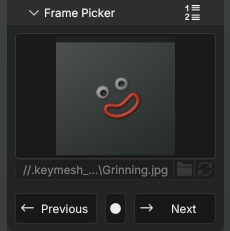
- Frame Picker gets a new UI mode: grid view, where Keymesh blocks can now be visualized with image thumbnails.
- Operator for generating thumbnails with viewport render.
BAKE TO KEYMESH
- New tool for baking regular animations as Keymesh blocks. The operator will create a new Keymesh block for each frame and apply (selected) modifiers and shape keys.
- Can bake down only on specified frame range and animate modifier visibility before and after Keymesh animation to enable smooth
Armature -> Keymesh -> Armatureanimation workflows.
STATIC KEYMESH
- Keymesh can now be used simply as a mesh versioning tool: it allows saving multiple versions of the mesh in the same object without animating them, and switching between them with a click!
- Static Keymesh objects benefit from all the tools of the add-on (frame picker UI, thumbnails, converting to individual objects, etc.) all of which were fine-tuned specifically for this case.
- "Convert to Separate Objects" operator gains a new "Explode" mode, which simply turns each Keymesh block into an individual object.
JOIN & EXTRACT
- New "Join as Keymesh" operator, which allows combining multiple objects into one Keymesh object (including multiple Keymesh objects). Works as Blenders "Join" operator, but makes object data of each selected object a new Keymesh block for active one.
- New "Extract Keymesh Block" operator that allows removing ("popping") individual blocks from Keymesh object and making them separate objects. Combined with the Join operator it allows users to extract blocks, work on them individually (including in other softwares), and put them back in Keymesh again.
UI/UX
- "Keyframe on Selection" was removed. Instead, now simply selecting a block in the list (or grid) assigns it to the object. No need to switch between selection and keyframing modes!
- Pin icons were changed by circles and icon state meanings were simplified.
- New filter menu in "Frame Picker" that allows hiding operator button (useful for static objects), and usage count (useful for improving performance).
- New "Keymesh" panel in scene properties where users can completely disable Keymesh animations for performance or testing reasons.
... and much more. Read full release notes at: https://github.com/nickberckley/keymesh/discussions/34
2.2.1
Compatibility
Blender
4.2
LTS
Unsupported
5.0 and above
- 37.7 KB
- 10176
-
July 11th, 2024
Changelog
- Bug fixes for 4.2 stable version.
- Option for persistent sculpt mode settings for Keymesh objects.
- Hold keyframes for duplicates reported in "Convert to Separate Objects".
- Files saved with Keymesh alpha are handled and updated by versioning.
- Back-up object put in originals collections when converting shape keys.
- Add-on keymaps are shown in preferences and can be edited from there.
More detailed changelog can be read here: https://github.com/nickberckley/keymesh/discussions/16#discussioncomment-10024217
2.2.0
Compatibility
Blender
4.2
LTS
Unsupported
5.0 and above
- 82.9 KB
- 570
-
June 12th, 2024
Changelog
Keymesh 2.2 update is focused on making Keymesh ready, or better suited for production environments. Updates include:
- Keymesh objects can be appended, linked, and library overridden.
- Support for render farms, background rendering, etc.
- Improved UI and tooltips.
- Deleting duplicates when preparing objects for 3D printing.
- Bug fixes, improved code quality, and more.
You can read full release notes here: https://github.com/nickberckley/keymesh/discussions/16
2.1.2
Compatibility
Blender
4.2
LTS
Unsupported
5.0 and above
- 30.8 KB
- 381
-
May 22nd, 2024
No changelog for this release.