
Extensions
  • Home
  • Add-ons
  • Themes
  • Approval Queue
  • About
  • Upload Extension
  • Sign in
  • BLENDER.ORG

    • Download

      Get the latest Blender, older versions, or experimental builds.

    • What's New

      Stay up-to-date with the new features in the latest Blender releases.

    DEVELOPMENT

    • Roadmap

      See which projects are currently being worked on and what's next.

    • Documentation

      Guidelines, release notes and development docs.

    LEARNING & RESOURCES

    • Blender Studio

      Access production assets and knowledge from the open movies.

    • Manual

      Documentation on the usage and features in Blender.

    • Benchmark

      A platform to collect and share results of the Blender Benchmark.

    • Blender Conference

      The yearly event that brings the community together.

    DONATE

    • Development Fund

      Support core development with a monthly contribution.

    • One-time Donations

      Perform a single donation with more payment options available.

All Add-ons

Add-on Timeline Buttons
Timeline Buttons
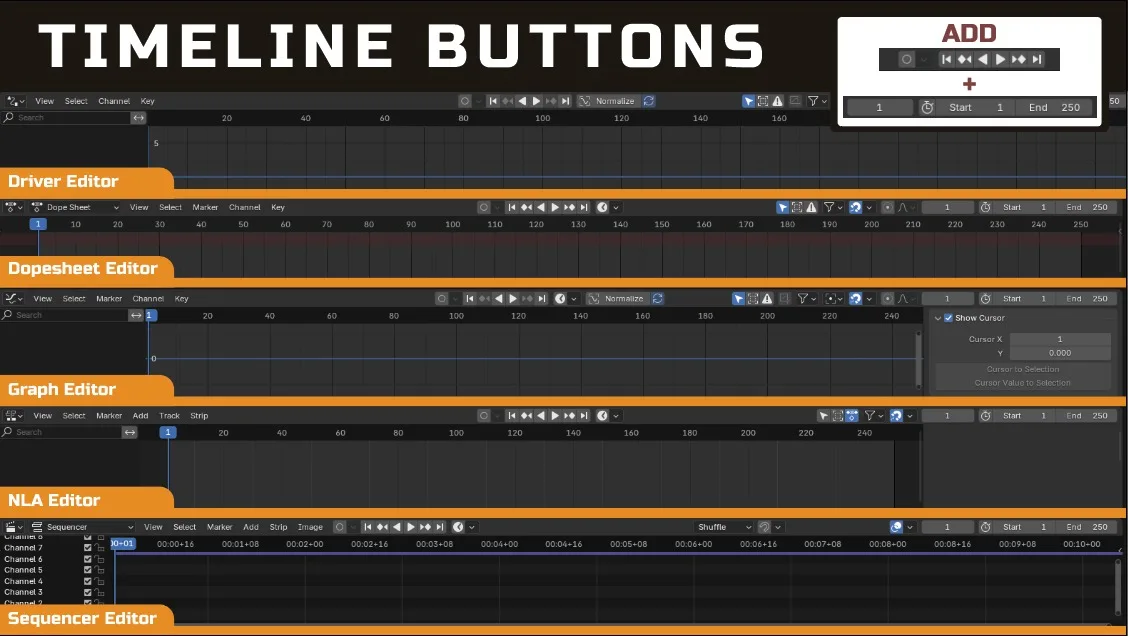
Put the buttons in timeline to other animation related editors.
Add-on by tinkerboi
About What's New Reviews Version History
Buttons Available in Different Animation Editors

Timeline Buttons

Add Buttons From Timeline Editor to Other Animation Related Editor

The Play Button, Pause Button, Autokey Options, and Frame Range are Added

Affected Editors

  • Sequencer Editor
  • Dopesheet Editor
  • Graph Editor
  • Driver Editor
  • NLA Editor

Note: Many larger animation-editor add-ons might also implement this feature so you might need to check if you already have other addon that include this feature


What's New

1.0.0 September 13th, 2024

Initial Release


Permissions

This extension does not require special permissions.

Developer
tinkerboi
Rating
(26)
Version
1.0.0
Updated
1 y
Published
Aug. 15th, 2024
Downloads
15701
Size
14.8 KB
Compatibility
Blender 4.2 LTS and newer
Website
github.com/BlenderBoi/timeline-buttons
Report Issues
discord.gg/EvMJxBM
License
GNU General Public License v3.0 or later
Animation
...or download and Install from Disk
  • 14.8 KB

Reviews

See all
  • gjKrypton
  • v1.0.0
  • 3 d

This is very strange. Dragging plugins into Blender from this page doesn't work, but searching for and installing the plugin in Blender's preferences makes it effective.

  • PauloDand
  • v1.0.0
  • 1 w

This is a great Add-on that definitely should be a native blender feature. However, limiting the add-on to just the 5 editors it currently supports is arbitrary. I wish this was a toggle on the side of the editor bar and I could open this ANYWHERE. Shader editor, Geometry Nodes Editor, the bottom of the properties' menu. This would be most useful in editors that have nothing to do with animation in the first place, so we don't need to cram the UI with 200 editors on top of each other.

  • jametc
  • v1.0.0
  • 6 mo

exactly what it says, handy for those of us trying to 'convert' to the dopesheet after using the timeline editor. I really want to have the ability to toggle it off on certain editors, because I don't need it on both my graph editor AND my dopesheet timeline.

5.0

26 reviews
5
4
3
2
1
Rate this Add-on Report an issue
  • About
  • Privacy Policy
  • Terms of Service
About
  • Blender Foundation
  • Blender Institute
  • Blender Studio
  • License
  • Logo & Trademark
  • Credits
  • Privacy Policy
  • Code of Conduct
Organization
  • People
  • Jobs
Blender Network
Download
  • Latest Blender
  • Blender LTS
  • Previous Versions
  • Experimental Builds
  • Source Code
  • Requirements
  • Benchmark
  • Flamenco
Extensions
  • Add-ons
  • Themes
Developers
  • Get Started
  • Roadmap
  • Projects
  • Docs
  • Blog
  • Forum
  • YouTube
  • Python API
Blender Studio
  • Films
  • Training
  • Tools & Pipeline
Support
  • Manual
  • Community
  • FAQ
Get Involved
  • Documentation
  • Education
News
  • Press Releases
  • User Stories
Blender Conference
Follow Blender
Support Blender
  • Donate
  • One-time Donation
Artistic freedom starts with Blender The Free and Open Source 3D Creation Suite