Extensions
  • Home
  • Add-ons
  • Themes
  • Approval Queue
  • About
  • Upload Extension
  • Sign in
  • BLENDER.ORG

    • Download

      Get the latest Blender, older versions, or experimental builds.

    • What's New

      Stay up-to-date with the new features in the latest Blender releases.

    DEVELOPMENT

    • Roadmap

      See which projects are currently being worked on and what's next.

    • Documentation

      Guidelines, release notes and development docs.

    LEARNING & RESOURCES

    • Blender Studio

      Access production assets and knowledge from the open movies.

    • Manual

      Documentation on the usage and features in Blender.

    • Benchmark

      A platform to collect and share results of the Blender Benchmark.

    • Blender Conference

      The yearly event that brings the community together.

    DONATE

    • Development Fund

      Support core development with a monthly contribution.

    • One-time Donations

      Perform a single donation with more payment options available.

All Add-ons

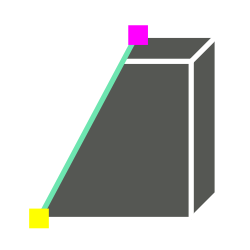
Add-on Snap Bisect
Snap Bisect

Bisect operator with snapping to vertices or edge midpoints.
Add-on by AdamDominec
About What's New Reviews Version History

5 Reviews

  • vojtastic-1
  • v1.0.6
  • 2 mo

Excellent tool, but the vertex selection only works on the active object. I would really appreciate the ability to select vertices from all selected objects OR from all objects in the viewport. Or am I missing something? The cut is then applied to all selected faces (not just the active object), so there's a bit of confusion here...

I would also appreciate it if the selectable points were much larger so I could see them better.

Also, I would appreciate the option to cut only in the plane between the selected nodes (rather than extending the cut across the entire plane).

  • M-25
  • v1.0.6
  • 8 mo

Great, but should be a native feature with knife tool and snapping enabled. To bad it needs an add-on (this one).

  • Kanjuro
  • v1.0.6
  • 9 mo

Perfect tool for something that should have been a native feature.

  • daniel-125
  • v1.0.4
  • 1 y

Very nice add-on. But it doesn't seem to work in orthographic view mode? (Blender version 4.43, add-on version 1.04) As soon as you select a point in orthographic view, you get an error, and the pink point remains on the screen and cannot be cleared.

  • AdamDominec replied
  • 1 y

Thanks for a positive review despite such a bug. The crash is fixed in version 1.05.

  • zubenelgennubi
  • v1.0.3
  • 1 y

really good add on, made my cut easier than before. I notice a bug, when your object origin not on the world center, your marker center (purple) is out of 3d space. Thank you...

  • AdamDominec replied
  • 1 y

Thanks for the notification. This bug is fixed, please use v1.0.4.

5 reviews

5.0

5 reviews
5
4
3
2
1
Rate this Add-on Report an issue
  • About
  • Privacy Policy
  • Terms of Service
About
  • Blender Foundation
  • Blender Institute
  • Blender Studio
  • License
  • Logo & Trademark
  • Credits
  • Privacy Policy
  • Code of Conduct
Organization
  • People
  • Jobs
Blender Network
Download
  • Latest Blender
  • Blender LTS
  • Previous Versions
  • Experimental Builds
  • Source Code
  • Requirements
  • Benchmark
  • Flamenco
Extensions
  • Add-ons
  • Themes
Developers
  • Get Started
  • Roadmap
  • Projects
  • Docs
  • Blog
  • Forum
  • YouTube
  • Python API
Blender Studio
  • Films
  • Training
  • Tools & Pipeline
Support
  • Manual
  • Community
  • FAQ
Get Involved
  • Documentation
  • Education
News
  • Press Releases
  • User Stories
Blender Conference
Follow Blender
Support Blender
  • Donate
  • One-time Donation
Artistic freedom starts with Blender The Free and Open Source 3D Creation Suite