Extensions
  • Home
  • Add-ons
  • Themes
  • Approval Queue
  • About
  • Upload Extension
  • Sign in
  • BLENDER.ORG

    • Download

      Get the latest Blender, older versions, or experimental builds.

    • What's New

      Stay up-to-date with the new features in the latest Blender releases.

    DEVELOPMENT

    • Roadmap

      See which projects are currently being worked on and what's next.

    • Documentation

      Guidelines, release notes and development docs.

    LEARNING & RESOURCES

    • Blender Studio

      Access production assets and knowledge from the open movies.

    • Manual

      Documentation on the usage and features in Blender.

    • Benchmark

      A platform to collect and share results of the Blender Benchmark.

    • Blender Conference

      The yearly event that brings the community together.

    DONATE

    • Development Fund

      Support core development with a monthly contribution.

    • One-time Donations

      Perform a single donation with more payment options available.

All Add-ons

Add-on Node Annotator
Node Annotator
Easily create good documentation of your node trees.
Add-on by FrankFirsching
About What's New Reviews Version History
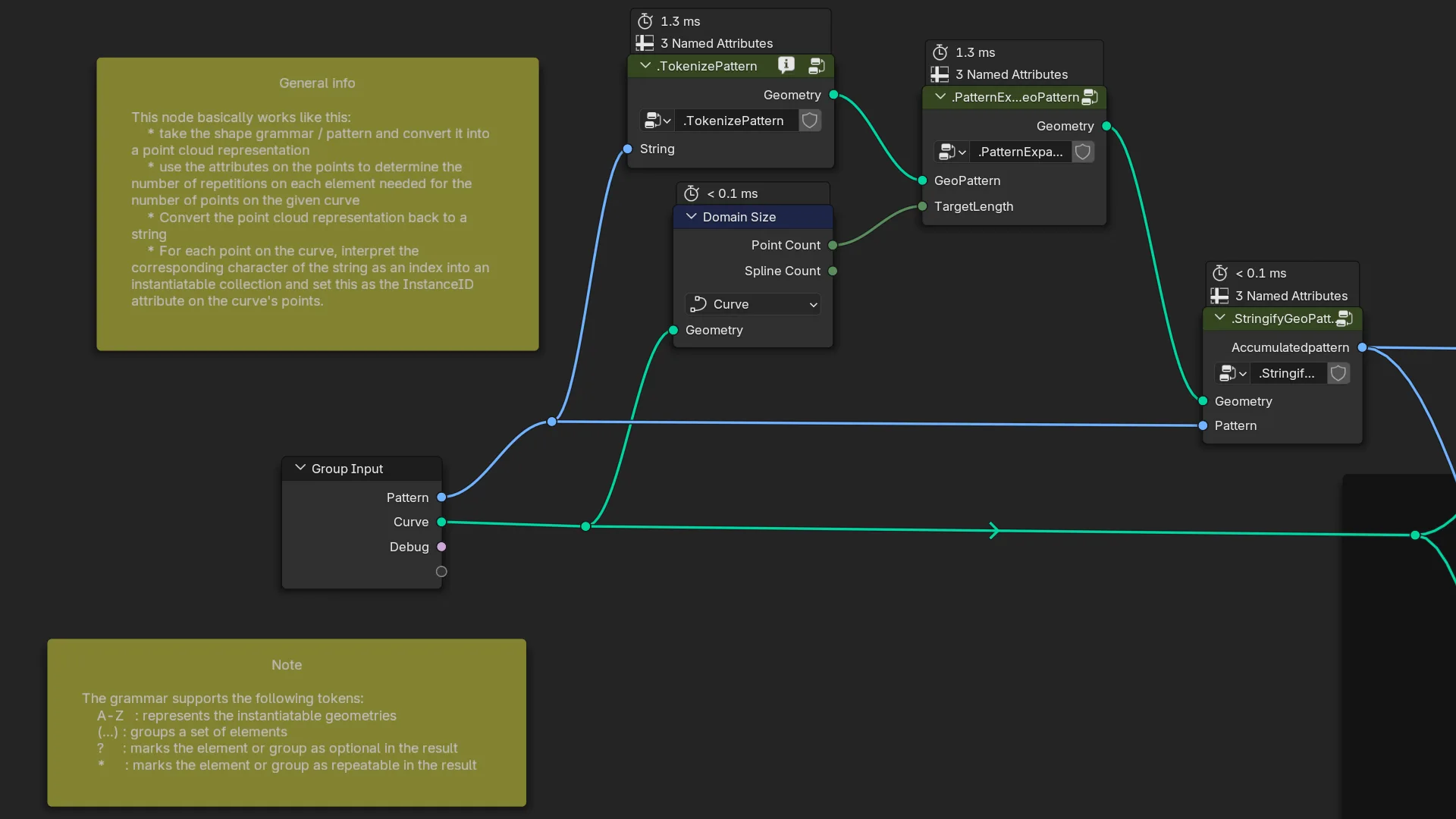
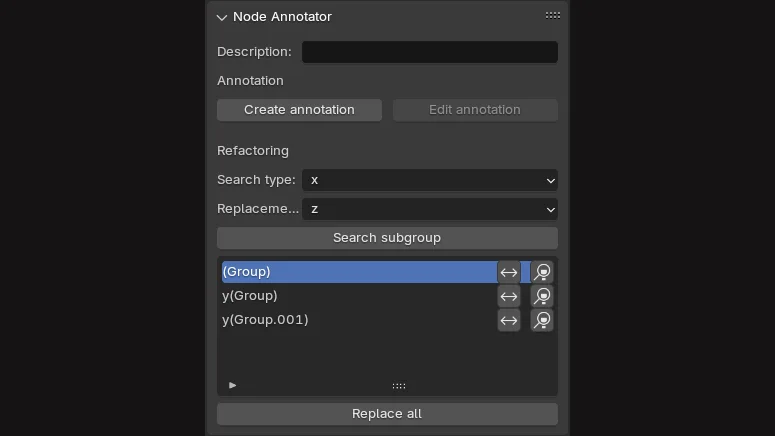
A partial node graph documented with this add-on. The side panel of this add-on.

Node Annotator

A utility add-on, that eases documenting and maintaining node graphs. It supports easy one-click creation and editing of annotation frames with text blocks. On the side panel of any graph editor, this add-on creates a new section "Node annotator" within the Node tab.

Annotation section

Description

A convenience edit field for the newly introduced Blender 4.2 property for the node group's tool-tip. This property is usually found on the Group tab. The add-on paints a small info icon into the header of node groups, that have a description and thus a tooltip. This behavior can be turned off in the preferences.

Create annotation

This command creates a new yellow annotation box in the current node graph in the middle of the view. It also creates a new text block and associates it with the annotation. As a last step it opens a new window with the text editor to enter the annotation text.

Edit annotation

The edit annotation command opens a new window with the text editor to edit the selected annotation text.

Refactoring section

The refactoring section can be used to find usages of custom node groups within the graph.

Search type

A drop down box, that allows to specify which node groups to search within the currently edited node tree.

Replacement type

A similar drop down box, but this one specifies the type of the node group to use for replacing a found node.

Search subgroup

Starts the search and lists the results in the list box below. Every entry has 2 buttons, one to replace the found node with the "Replacement type" and one to jump to that node.

Replace all

This button refactors all occurrences of the search type to the replacement type.


What's New

0.4.3 April 4th, 2026

Bugfix for Blender 5.1

See all versions


Permissions

This extension does not require special permissions.

Developer
FrankFirsching
Rating
(18)
Version
0.4.3
Updated
3 mo
Published
May 22nd, 2024
Downloads
23799
Size
28.0 KB
Compatibility
Blender 4.2 LTS and newer
Website
gitlab.com/subdivided_xyz/node_annotator
Report Issues
gitlab.com/subdivided_xyz/node_annotator/-/issues
License
GNU General Public License v3.0 or later
Node Geometry Nodes
...or download and Install from Disk
  • 28.0 KB

Reviews

See all
  • Giacomo-2
  • v0.4.3
  • 2 w

WOOOOW I really needed that! thank you so much! This will save me a ton of time!

  • OrangeYo
  • v0.4.2
  • 3 mo

good!

  • aryeramaty
  • v0.4.2
  • 1 y

🙏

5.0

18 reviews
5
4
3
2
1
Rate this Add-on Report an issue
  • About
  • Privacy Policy
  • Terms of Service
About
  • Blender Foundation
  • Blender Institute
  • Blender Studio
  • License
  • Logo & Trademark
  • Credits
  • Privacy Policy
  • Code of Conduct
Organization
  • People
  • Jobs
Blender Network
Download
  • Latest Blender
  • Blender LTS
  • Previous Versions
  • Experimental Builds
  • Source Code
  • Requirements
  • Benchmark
  • Flamenco
Extensions
  • Add-ons
  • Themes
Developers
  • Get Started
  • Roadmap
  • Projects
  • Docs
  • Blog
  • Forum
  • YouTube
  • Python API
Blender Studio
  • Films
  • Training
  • Tools & Pipeline
Support
  • Manual
  • Community
  • FAQ
Get Involved
  • Documentation
  • Education
News
  • Press Releases
  • User Stories
Blender Conference
Follow Blender
Support Blender
  • Donate
  • One-time Donation
Artistic freedom starts with Blender The Free and Open Source 3D Creation Suite