
Extensions
  • Home
  • Add-ons
  • Themes
  • Approval Queue
  • About
  • Upload Extension
  • Sign in
  • BLENDER.ORG

    • Download

      Get the latest Blender, older versions, or experimental builds.

    • What's New

      Stay up-to-date with the new features in the latest Blender releases.

    DEVELOPMENT

    • Roadmap

      See which projects are currently being worked on and what's next.

    • Documentation

      Guidelines, release notes and development docs.

    LEARNING & RESOURCES

    • Blender Studio

      Access production assets and knowledge from the open movies.

    • Manual

      Documentation on the usage and features in Blender.

    • Benchmark

      A platform to collect and share results of the Blender Benchmark.

    • Blender Conference

      The yearly event that brings the community together.

    DONATE

    • Development Fund

      Support core development with a monthly contribution.

    • One-time Donations

      Perform a single donation with more payment options available.

All Add-ons

Add-on Lumos
Lumos

Bring your lighting to the next level.
Add-on by Eqkoss
About What's New Reviews Version History
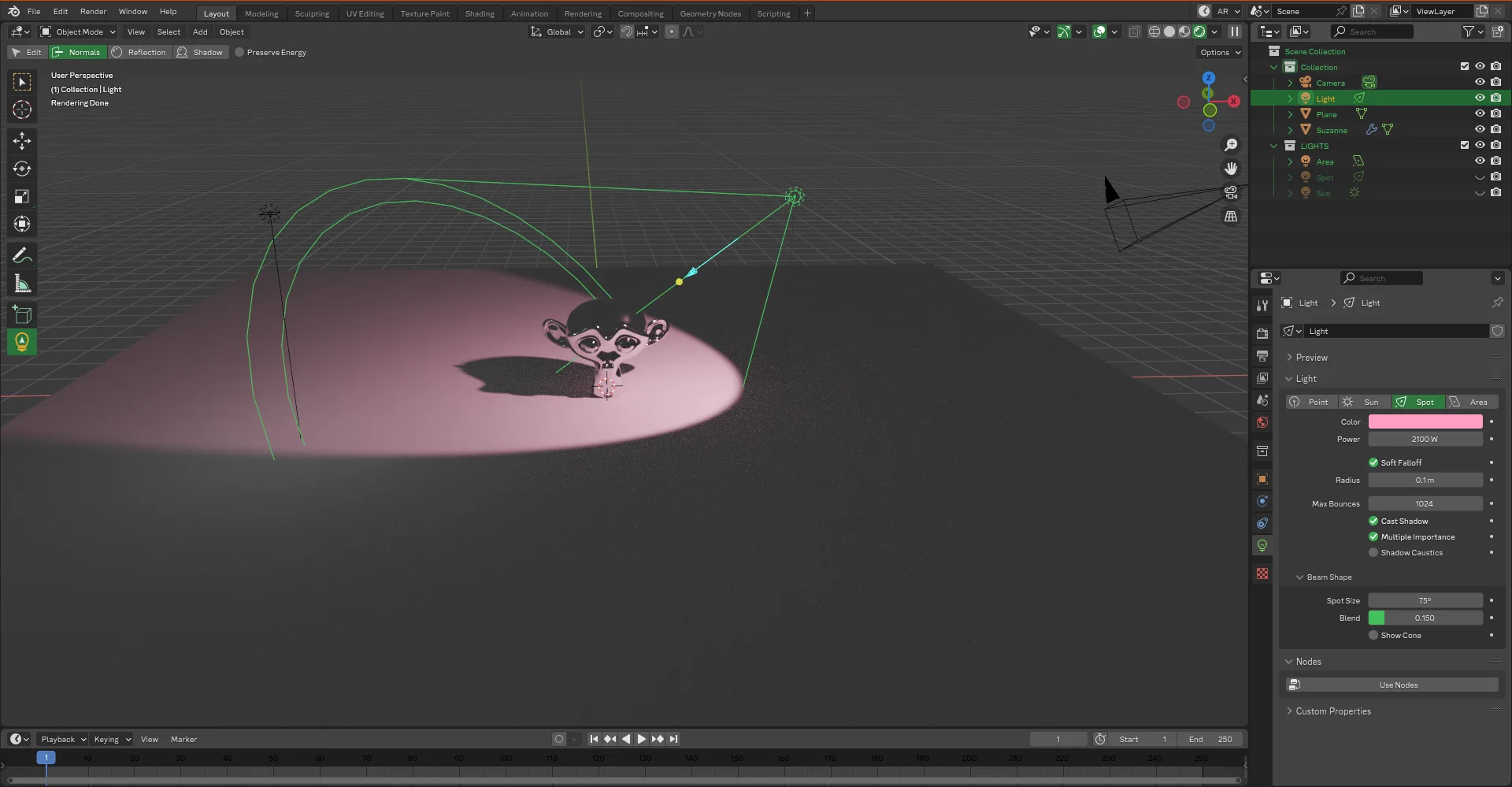
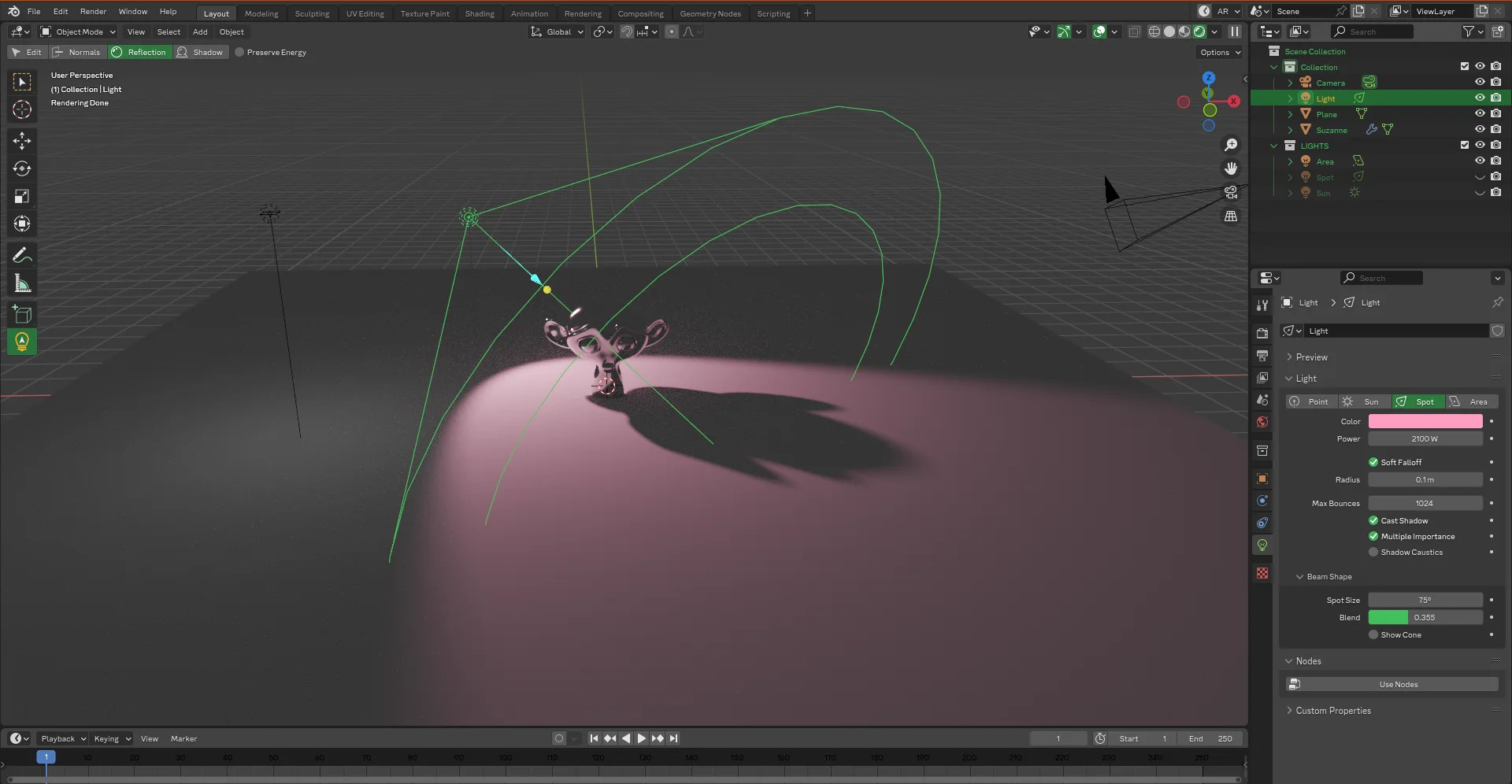
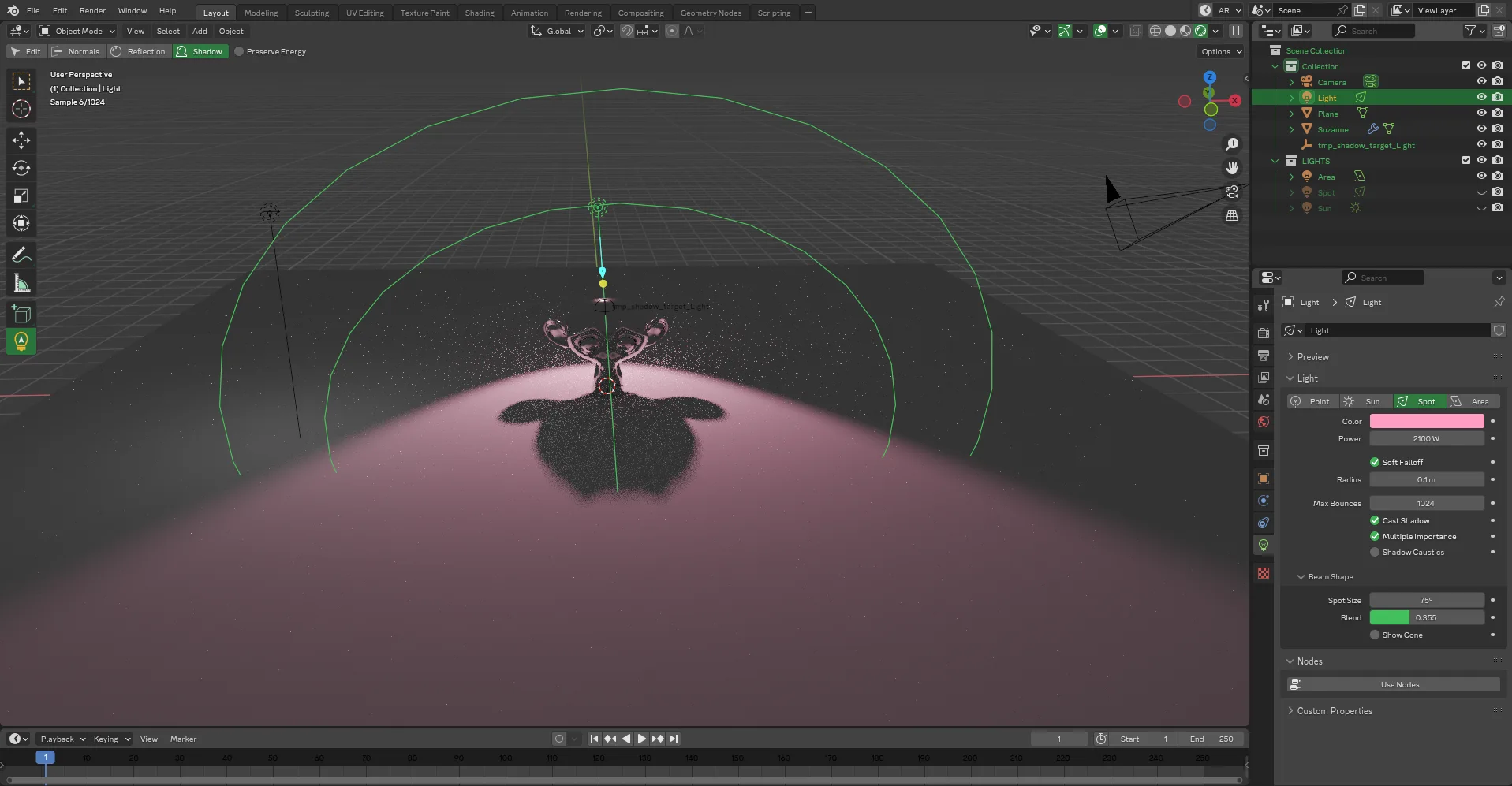
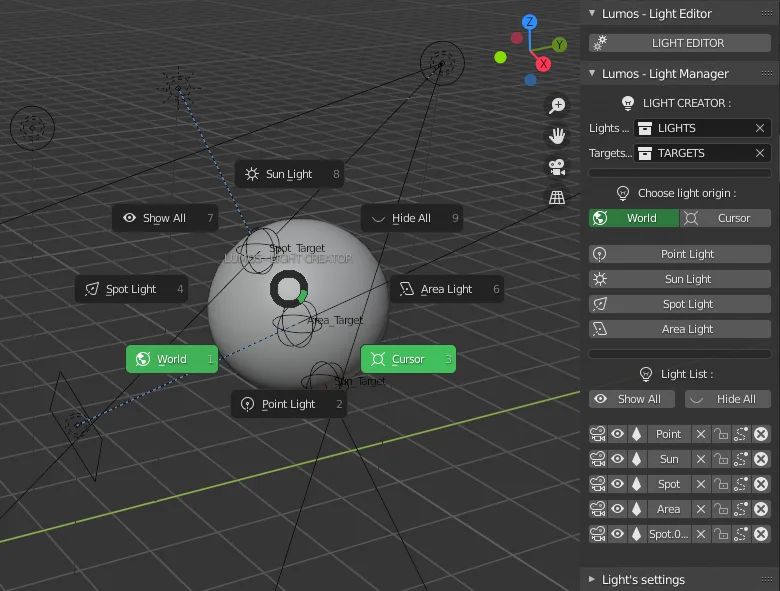
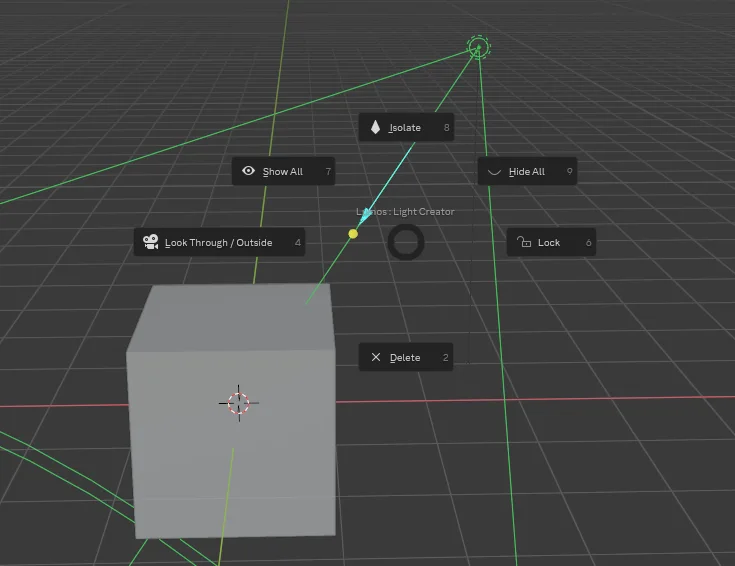
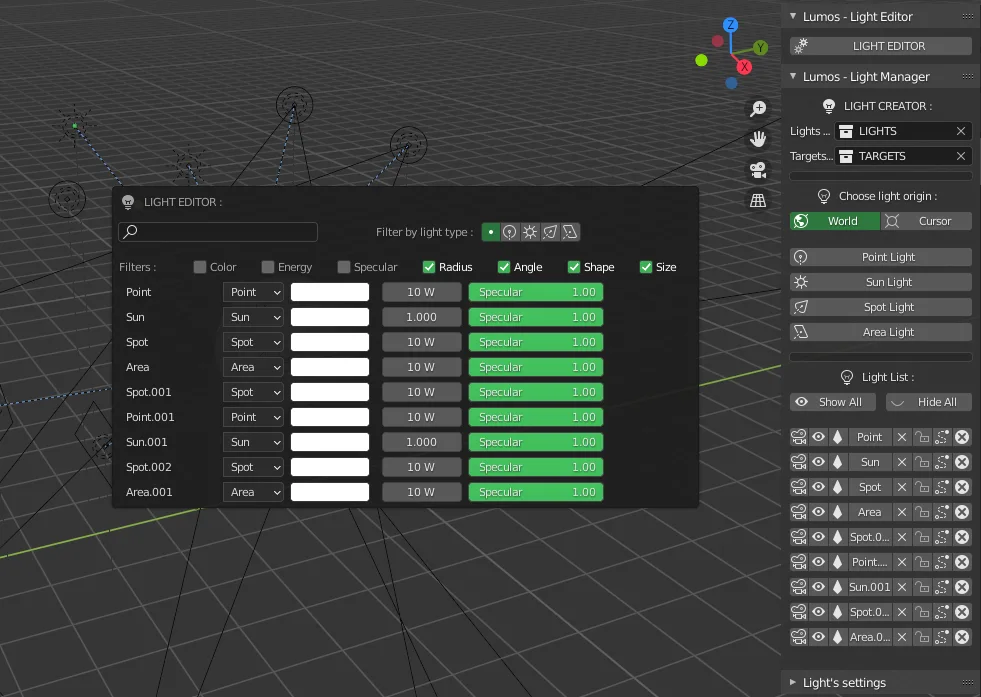
Interactive Light placement according to normals Interactive Light placement according to specular/reflection Interactive Light placement according to shadow Pie menu to quickly create lights Pie menu to quickly acces to the operator tools Light Editor and N-Panel

WHAT IS LUMOS ?

  • Lumos is a light editor & manager. It will allow you to speed up your lighting process and will bring you some additional features.

  • It comes with pie menus and tools that will give you more flexibility in your creation process.

  • New Tool unlock artistic light placement in your scene by giving you acces to new interative operators.


FEATURES

WARNING: For french users (AZERTY), QUOTE key(") is SQUARRED key (²)

  • Light Panel Editor : press CTRL + "(QUOTE) in the 3D View : List all the light of the scene and modify them.

  • Light Manager : N-PANEL :

    1. press SHIT + "(QUOTE) in the 3D View when no light is selected : Create lights in a choosen collection and decide where those lights are created (at world position or cursor position)
    2. press SHIT + "(QUOTE) in the 3D View with a light selected : Show/Hide All, Isolate, Lock, LookThrought and Delete.
  • Light Edit Tool : press L in the 3D View with a selected light

    1. Edit Mode : press 1 (ONE) in the 3D View : Keep the standard control & add some custom features:
      • E : Increase/decrease the light energy by moving horizontally.
      • F : Move forward/toward in local Z Axe.
      • C : Change light's color.
        1. C + X : Change light's hue.
        2. C + Y : Change light's value.
    2. Normals Mode : press 2 (TWO) in the 3D View : Interactively places the light according to the normal.
    3. Reflection(Specular) Mode : press 3 (THREE) in the 3D View : Interactively places light according to its reflection.
    4. Shadow Mode : press 4 (FOUR) in the 3D View : Interactively places light according to the shadow cast.
    5. Preserve Energy : Enale or disable : Interactively changes the light intensity to keep the same intensity regardless of distance.

What's New

3.2.2 March 27th, 2026

BUGS FIXS & UPDATE

FIX:
    - Previously, a warning log was displayed with some function (lock_transform, etc) when lights/emmiters are in inbetween state (deleted but not purged), in library override state and so on.

See all versions


Permissions

This extension does not require special permissions.

Developer
Eqkoss
Rating
(5)
Version
3.2.2
Updated
2 mo
Published
Nov. 20th, 2024
Downloads
22745
Size
39.2 KB
Compatibility
Blender 4.2 LTS and newer
Report Issues
github.com/OsmosePicturesAnimation/BLENDER_ADDONS/issues
License
GNU General Public License v3.0 or later
3D View Lighting
...or download and Install from Disk
  • 39.2 KB

Reviews

See all
  • Coverop
  • v3.2.2
  • 4 w

Manage all lighting sources in one place. Lumos Lighting Pie is an excellent!

Note: The Lumos Lighting Pie should contain more information (add operation description, how It impacts)

  • Shunya-Saiki
  • v3.2.0
  • 8 mo

Works well on Blender 4.5.2. Great when you are managing a lot of lights for a product shot for example.

  • Jeff-Bellune
  • v3.2.0
  • 9 mo

Really good work on this addon! Thank you for making it available.

  • Eqkoss replied
  • 9 mo

You are welcome ! Thanks for your support/review <3

5.0

5 reviews
5
4
3
2
1
Rate this Add-on Report an issue
  • About
  • Privacy Policy
  • Terms of Service
About
  • Blender Foundation
  • Blender Institute
  • Blender Studio
  • License
  • Logo & Trademark
  • Credits
  • Privacy Policy
  • Code of Conduct
Organization
  • People
  • Jobs
Blender Network
Download
  • Latest Blender
  • Blender LTS
  • Previous Versions
  • Experimental Builds
  • Source Code
  • Requirements
  • Benchmark
  • Flamenco
Extensions
  • Add-ons
  • Themes
Developers
  • Get Started
  • Roadmap
  • Projects
  • Docs
  • Blog
  • Forum
  • YouTube
  • Python API
Blender Studio
  • Films
  • Training
  • Tools & Pipeline
Support
  • Manual
  • Community
  • FAQ
Get Involved
  • Documentation
  • Education
News
  • Press Releases
  • User Stories
Blender Conference
Follow Blender
Support Blender
  • Donate
  • One-time Donation
Artistic freedom starts with Blender The Free and Open Source 3D Creation Suite