Extensions
  • Home
  • Add-ons
  • Themes
  • Approval Queue
  • About
  • Upload Extension
  • Sign in
  • BLENDER.ORG

    • Download

      Get the latest Blender, older versions, or experimental builds.

    • What's New

      Stay up-to-date with the new features in the latest Blender releases.

    DEVELOPMENT

    • Roadmap

      See which projects are currently being worked on and what's next.

    • Documentation

      Guidelines, release notes and development docs.

    LEARNING & RESOURCES

    • Blender Studio

      Access production assets and knowledge from the open movies.

    • Manual

      Documentation on the usage and features in Blender.

    • Benchmark

      A platform to collect and share results of the Blender Benchmark.

    • Blender Conference

      The yearly event that brings the community together.

    DONATE

    • Development Fund

      Support core development with a monthly contribution.

    • One-time Donations

      Perform a single donation with more payment options available.

All Add-ons

Add-on Bone Aligner
Bone Aligner

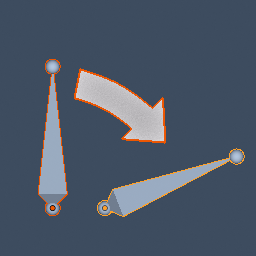
Quickly align two bones.
Add-on by maylog
About What's New Reviews Version History

Version History

1.1.4
Compatibility
Blender 4.2 LTS and newer
  • 2.8 KB
  • 3296
  • January 4th, 2026

Changelog

  • Fixed TypeError: Resolved bpy_struct.__new__(struct): expected a single argument by refactoring logic into standalone functions instead of trying to instantiate operator classes directly.
  • Logic Refactoring: Decoupled alignment and constraint logic from the Operator classes for better stability and maintainability.
  • Case Sensitivity Fix: Improved the matching dictionary to correctly handle case-insensitive lookups when the option is toggled.
  • UI Cleanup: Organized the Properties panel with clearer grouping and icons for Edit and Pose modes.
Compatibility
Blender 4.2 LTS and newer
Downloads
3296
Size
2.8 KB
Permissions
No special permissions required.
License
GNU General Public License v3.0 or later
Status
Approved
v1.1.4 2.8 KB
1.1.3
Compatibility
Blender 4.2 LTS and newer
  • 3.1 KB
  • 2694
  • October 31st, 2025

Changelog

Optimized the renaming feature to prompt users to turn off X-Axis Mirror mode when the model is in X-Axis Mirror mode.

Compatibility
Blender 4.2 LTS and newer
Downloads
2694
Size
3.1 KB
Permissions
No special permissions required.
License
GNU General Public License v3.0 or later
Status
Approved
v1.1.3 3.1 KB
1.1.2
Compatibility
Blender 4.2 LTS and newer
  • 3.2 KB
  • 1912
  • August 15th, 2025

Changelog

Button Display:All buttons are always visible.

Buttons are disabled (grayed out) when not in Edit Mode (EDIT_ARMATURE) or Pose Mode (POSE).

Compatibility
Blender 4.2 LTS and newer
Downloads
1912
Size
3.2 KB
Permissions
No special permissions required.
License
GNU General Public License v3.0 or later
Status
Approved
v1.1.2 3.2 KB
1.1.1
Compatibility
Blender 4.2 LTS and newer
  • 3.2 KB
  • 568
  • July 23rd, 2025

Changelog

Added “Selected to Active Name” button to rename selected bone to active bone’s name.

Added “Active to Selected Name” button to rename active bone to selected bone’s name.

Compatibility
Blender 4.2 LTS and newer
Downloads
568
Size
3.2 KB
Permissions
No special permissions required.
License
GNU General Public License v3.0 or later
Status
Approved
v1.1.1 3.2 KB
1.1.0
Compatibility
Blender 4.2 LTS and newer
  • 2.9 KB
  • 415
  • July 10th, 2025

Changelog

Added the ability to align bones in pose mode. Note: Alignment may not work well when bones are of different lengths.

Compatibility
Blender 4.2 LTS and newer
Downloads
415
Size
2.9 KB
Permissions
No special permissions required.
License
GNU General Public License v3.0 or later
Status
Approved
v1.1.0 2.9 KB
1.0.2
Compatibility
Blender 4.2 LTS and newer
  • 2.3 KB
  • 267
  • June 30th, 2025

Changelog

Performance Optimization:Optimized bone name matching using a dictionary (selected_bone_dict), reducing matching time complexity from O(n*m) to O(n), significantly improving performance for large armatures. Rewrote get_sorted_bones function to use non-recursive topological sorting (DFS), improving efficiency for complex armatures and avoiding stack overflow.

Code Refactoring:Moved compare_names function to module level, shared by both operator classes (BONEALIGNER_OT_AlignActiveToSelected and BONEALIGNER_OT_AlignSelectedToActive), reducing code duplication. Refactored align_bones method to consolidate active_to_selected cases, minimizing redundant code.

UI Improvements:Added a prompt label in the UI panel: "Select two armatures to align their bones," clarifying user requirements. Optimized poll method to ensure the panel and buttons are only visible in Edit Mode with at least two armatures selected.

*Tested, version 3.6 can also run this plugin.

Compatibility
Blender 4.2 LTS and newer
Downloads
267
Size
2.3 KB
Permissions
No special permissions required.
License
GNU General Public License v3.0 or later
Status
Approved
v1.0.2 2.3 KB
1.0.1
Compatibility
Blender 4.4 and newer
  • 2.1 KB
  • 54
  • June 29th, 2025

Changelog

Fix wrong manifest content

Compatibility
Blender 4.4 and newer
Downloads
54
Size
2.1 KB
Permissions
No special permissions required.
License
GNU General Public License v3.0 or later
Status
Approved
v1.0.1 2.1 KB
1.0.0
Compatibility
Blender 4.4 and newer
  • 2.1 KB
  • 27
  • June 29th, 2025

Changelog

Initial submission

Compatibility
Blender 4.4 and newer
Downloads
27
Size
2.1 KB
Permissions
No special permissions required.
License
GNU General Public License v3.0 or later
Status
Approved
v1.0.0 2.1 KB
8 versions
  • About
  • Privacy Policy
  • Terms of Service
About
  • Blender Foundation
  • Blender Institute
  • Blender Studio
  • License
  • Logo & Trademark
  • Credits
  • Privacy Policy
  • Code of Conduct
Organization
  • People
  • Jobs
Blender Network
Download
  • Latest Blender
  • Blender LTS
  • Previous Versions
  • Experimental Builds
  • Source Code
  • Requirements
  • Benchmark
  • Flamenco
Extensions
  • Add-ons
  • Themes
Developers
  • Get Started
  • Roadmap
  • Projects
  • Docs
  • Blog
  • Forum
  • YouTube
  • Python API
Blender Studio
  • Films
  • Training
  • Tools & Pipeline
Support
  • Manual
  • Community
  • FAQ
Get Involved
  • Documentation
  • Education
News
  • Press Releases
  • User Stories
Blender Conference
Follow Blender
Support Blender
  • Donate
  • One-time Donation
Artistic freedom starts with Blender The Free and Open Source 3D Creation Suite