 Vertex Overlap
Alerts you to overlapping vertices in real-time.
Vertex Overlap
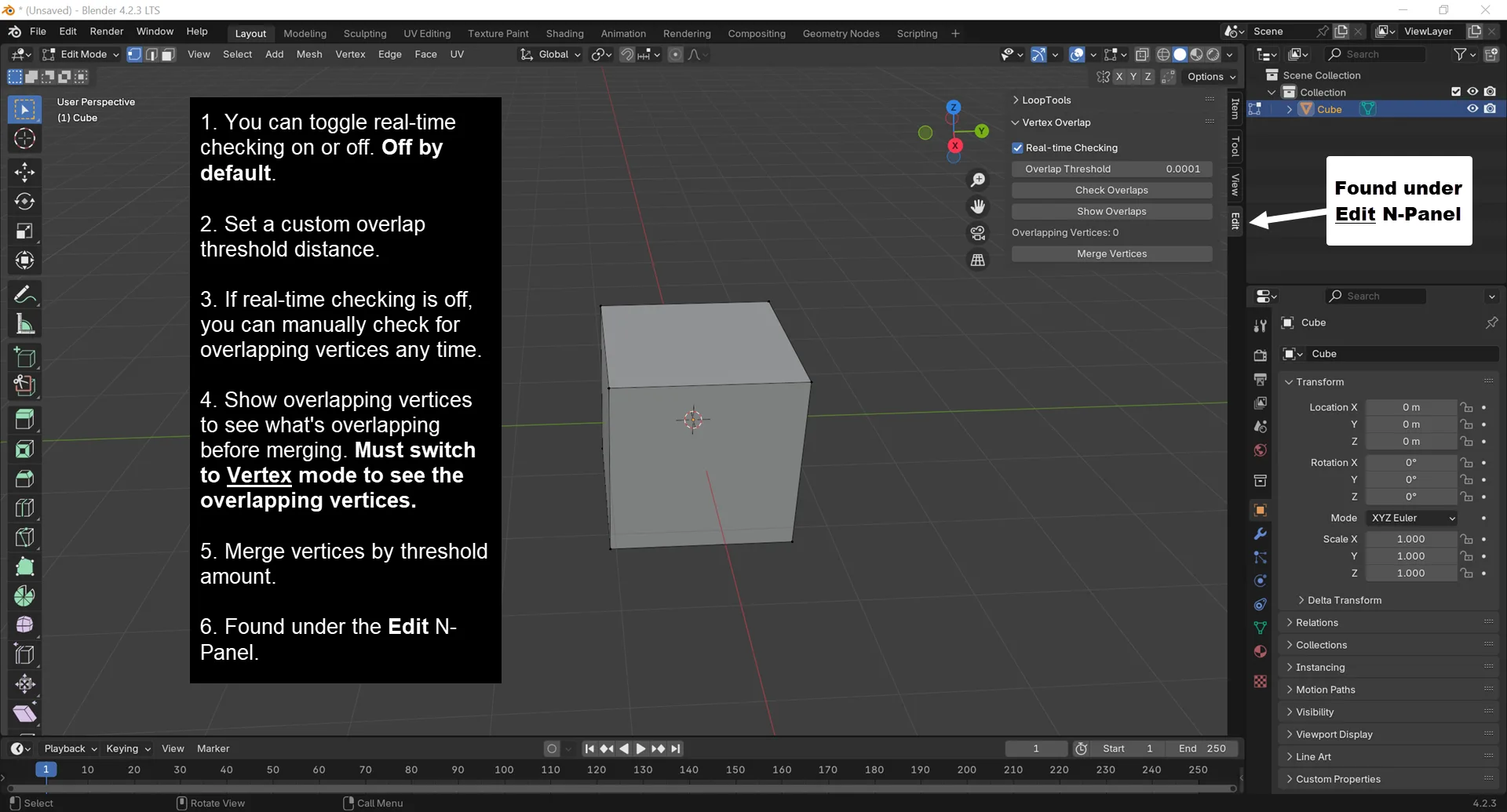
Found under the Edit N-panel, Vertex Overlap is a Blender add-on that alerts you to overlapping vertices in real-time and allows you to merge them with a single click.
Have you ever started, then canceled an extrusion? If you don't remember to immediately undo your last action, you will create overlapping vertices that aren't easy to spot until you start noticing weird rendering issues or you experience odd issues while editing your mesh.
Features
- Alerts you to new overlapping vertices in real-time. Disabled by default, but enabled with a simple checkbox.
Show Overlapsbutton will highlight vertex overlaps, so you can preview what will be merged. You must be in Vertex Selection Mode to see the highlighted overlaps.- You can set a custom
Overlap Thresholddistance. If you only want to be alerted about overlapping vertices of a certain distance. The default is 0.0001m. - If real-time checking is disabled, you can manually check for overlapping vertices by clicking the
Check Overlapsbutton at anytime while in Edit mode. - Provides a convenient
Merge Verticesbutton that will merge overlapping vertices by the configuredOverlap Thresholddistance. This is equivalent toSelecting Alland thenMerging by Distance. Now in a convenient single click. - If you select multiple objects and tab to
Editmode, theOverlapping Verticescount will reflect the number of overlapping vertices in both mesh objects combined. If you have two objects, each with 2 overlapping vertices, and select both then tab to Edit mode,Vertex Overlapwill show4total overlapping vertices.
What's New
1.1.0 December 19th, 2024
- Added a
Show Overlapsbutton so you can see which vertices are overlapping. Useful if you just want to see which vertices are overlapping without merging them. You must switch to Vertex Selection mode to see which vertices are overlapping.
"Show Overlaps" without having to merge is incredibly useful, thanks!