 Path Actions

This addon helps interact with filesystem locations relative to current blend file.
Here is a video demo of the main features (lots of new feature since recording) : https://www.youtube.com/watch?v=MUz2RAfHA3I
See here for illustrated doc : https://github.com/Pullusb/SB_path_actions
Open Blend's Folder
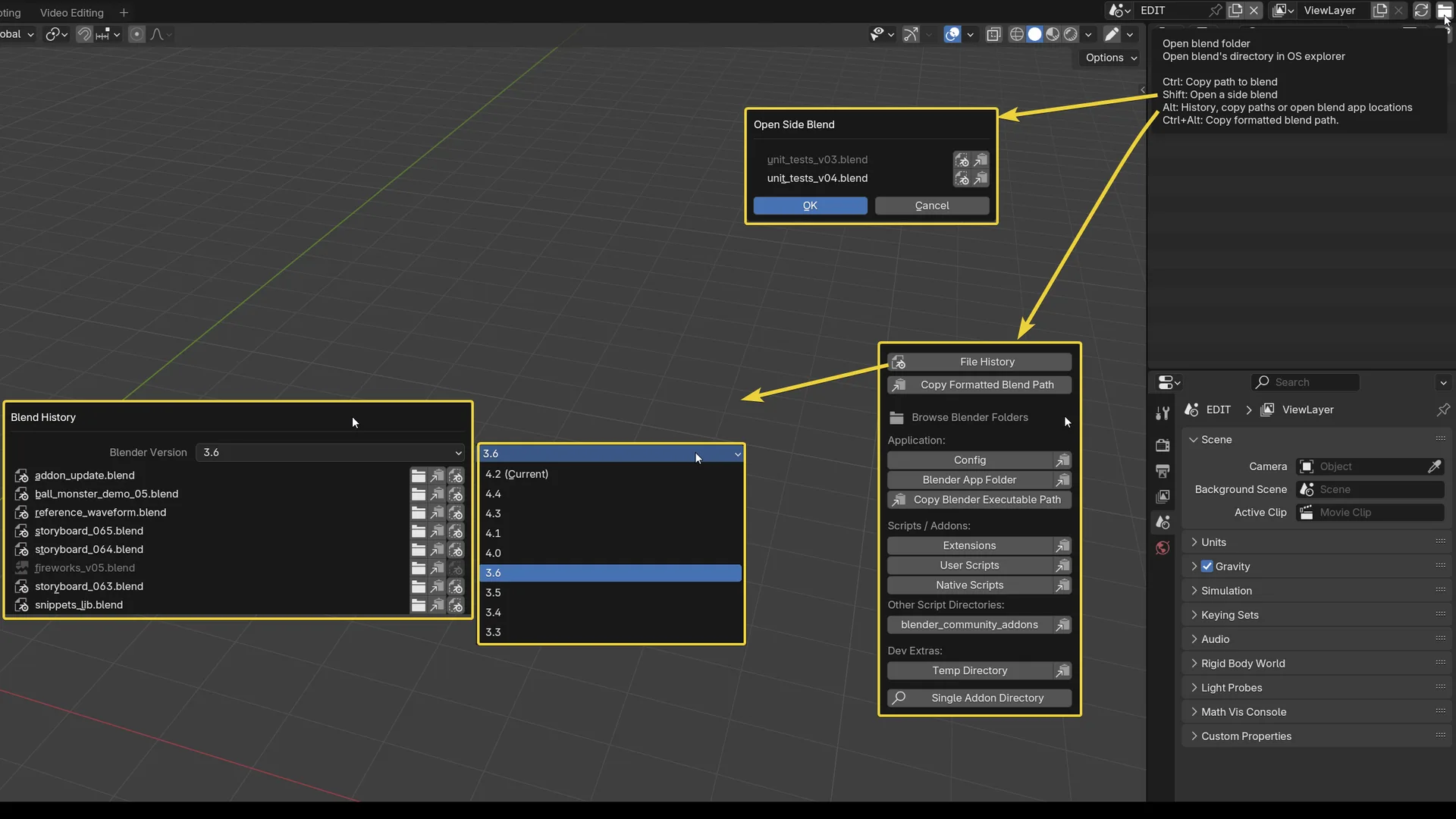
The main feature: A cute little folder button appear on header's top-right that will open current blend's folder in OS file browser.
Modifier-keys + click on the button to trigger other actions:
Ctrl + Click: Copy Blend pathShift + Click: Open Side BlendAlt + Click: Alternative actionsCltr + Alt + Click: Copy formatted path to Blend popup
Note: Even on submenus, when there is a
Copyicon related to a path,Alt + Clickon it call a popup to chose alternative path formats with quote style choice.
Open Side Blend menu (Shift + Click)
List other blend file in the same folder as current blend (ordered):
- Click on filename to open, replacing current instance.
- Click on the dotted blender file icon to open in another blender instance.
- Click on "copy" icon to copy path to blend
Alternative actions menu (Alt + Click)
This menu show an extended set of path related actions:
File history (enhanced "Open recent", also on Ctrl + Shift + Alt + o):
- choose to inspect another blender version history (default to current blender version)
- click on a file name to open in-place (same as classic history)
- open in new blender instance
- open folder in OS
- copy blend path (
Alt + clickon it for alternative formatting choice) - choices are greyed out when files are no longer available (in this case, open folder bring to the uppermost available folder).
Copy formatted path to Blend (same as Ctrl+Alt+Click on corner folder icon)
open/copy app related paths:
- blender-app/config/temp/script-directories folders
- copy path to executable
- search/open addon folder
- search/open addon preferences
Addon preferences
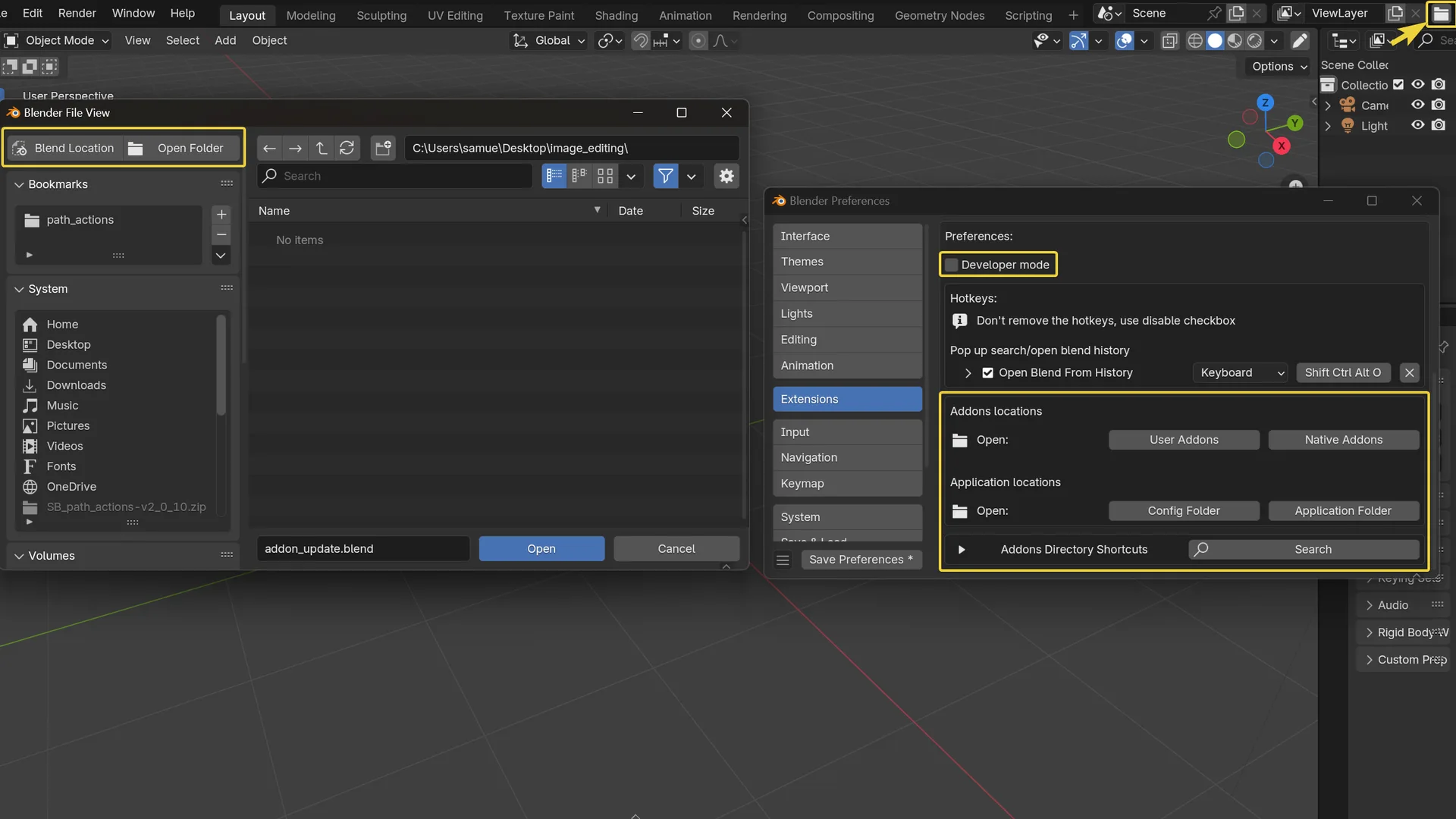
Add buttons to open blender app related folders: addons, config, etc... (same as Alt+Click on corner folder icon)
Open any addons folder with list of buttons or using search feature.
Blender file browser
Button to open browsed folder in operating system file browser.
Button to set browser where the blend is
Switch output path type between relative and absolute
This is called through F3 search operator, (if you have developer extras enabled in preferences > interface)
Options for developers
"Developer mode" checkbox needs to be ticked in preference.
Full blend reload on current file:
- Another button appears at the top corner next to the folder icon.
- Triggers a full refresh of the blend (launch the file in a fully new blender instance and close the current). Useful for super quick reload when developing addons without IDE debugger.
Link checker:
- add "Check File Links" button in Alt Menu, and single chain icon button in header of the 'Blend file' outliner mode.
- list external files linked or used within current blend file with multiple filters
- add library's filepath direct edition/update (use this feature with caution, incremental save is recommended before use)
What's New
2.8.0 April 14th, 2026
Fixed
- Error when opening on new instance using a relative filepath (when using right-click menu on a library in outliner -> Open in new instance)
Added
Alt + Clickingon open in new instance allow opening without extra arguments from command lines (tooltip shows when there are more than two, mostly interesting for dev and TD peoples)- Shows a
Copy Launch Commandoption in folder icon Alt menu when dev mode is enabled.
This should be a inbuilt blender feature!