 Overscan Render

Overscan is a Blender addon that allows you to render your image with an overscan, with three different options.
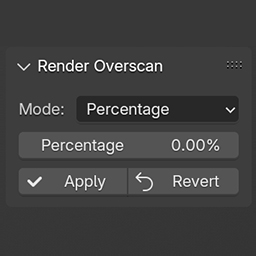
Once installed, a new Overscan option will apprea in the Output settings under the reder resolution.
MODES:
Percentage will allow you to specify a percentage that you would like to add to the render resolution. For example, if the original version is 1920x1080 and you add 10%, you will endup with a resoultion of 2112x1188.
Extra pixel will add the desired amount of pixel in the overscan area of the image. So if you ask 100, you will get 2020x1180.
Specific X resolution will set the X resoution to the input and adapt the y resolution to keep the same aspect ratio.
A tiny line will show the original cropping in the viewport.
The camera gets renamed with _o when overscan but goes back to its original name if reset.
Note that for every change that you make you need to press the reset button first.
This will work for any rendering engine.
You can see a video description at https://www.youtube.com/watch?v=yXSfgBu5Rac
Please note the the addon is now locates in the render output instead of a viewport tab. Check this clip for more details: https://youtu.be/yXSfgBu5Rac
What's New
1.2.3 December 25th, 2025
Fixed aspect ratio issue in pixel mode
Thanks for the great extension! I think I found a small bug, though it's possible it's an intended feature for reasons known to people who use Blender more seriously than I. When rendering in portrait-orientation (Y larger than X) using the "extra pixels" mode, alignment & sizing are not preserved the way they are with landscape orientation and percentage mode. I'm using 4.2, if that matters.
Im having issues with versions 1.2.0 and 1.2.1, and only when I've switched back to version 1.1.0 - everything is aligning properly, otherwise - great addon
Great stuff - I'd been thinking about making something similar for a while, and this has just come in handy for one of those "Hey, I need to move the logo you made up by 50 pixels..." type requests.
I have a feature suggestion - could there be an option to only render the overscan area, so that it could then be comped back in with the original, saving rendering time?
Bonus points if it could setup the compositing layers for you.
(I know it'll probably not work so good with eevee's screen space reflections etc, but maybe there could be a setting to re-render enough of the outer edge of the screen and then blend in the compositor?