Extensions
  • Home
  • Add-ons
  • Themes
  • Approval Queue
  • About
  • Upload Extension
  • Sign in
  • BLENDER.ORG

    • Download

      Get the latest Blender, older versions, or experimental builds.

    • What's New

      Stay up-to-date with the new features in the latest Blender releases.

    DEVELOPMENT

    • Roadmap

      See which projects are currently being worked on and what's next.

    • Documentation

      Guidelines, release notes and development docs.

    LEARNING & RESOURCES

    • Blender Studio

      Access production assets and knowledge from the open movies.

    • Manual

      Documentation on the usage and features in Blender.

    • Benchmark

      A platform to collect and share results of the Blender Benchmark.

    • Blender Conference

      The yearly event that brings the community together.

    DONATE

    • Development Fund

      Support core development with a monthly contribution.

    • One-time Donations

      Perform a single donation with more payment options available.

All Add-ons

Add-on Maze Generator
Maze Generator
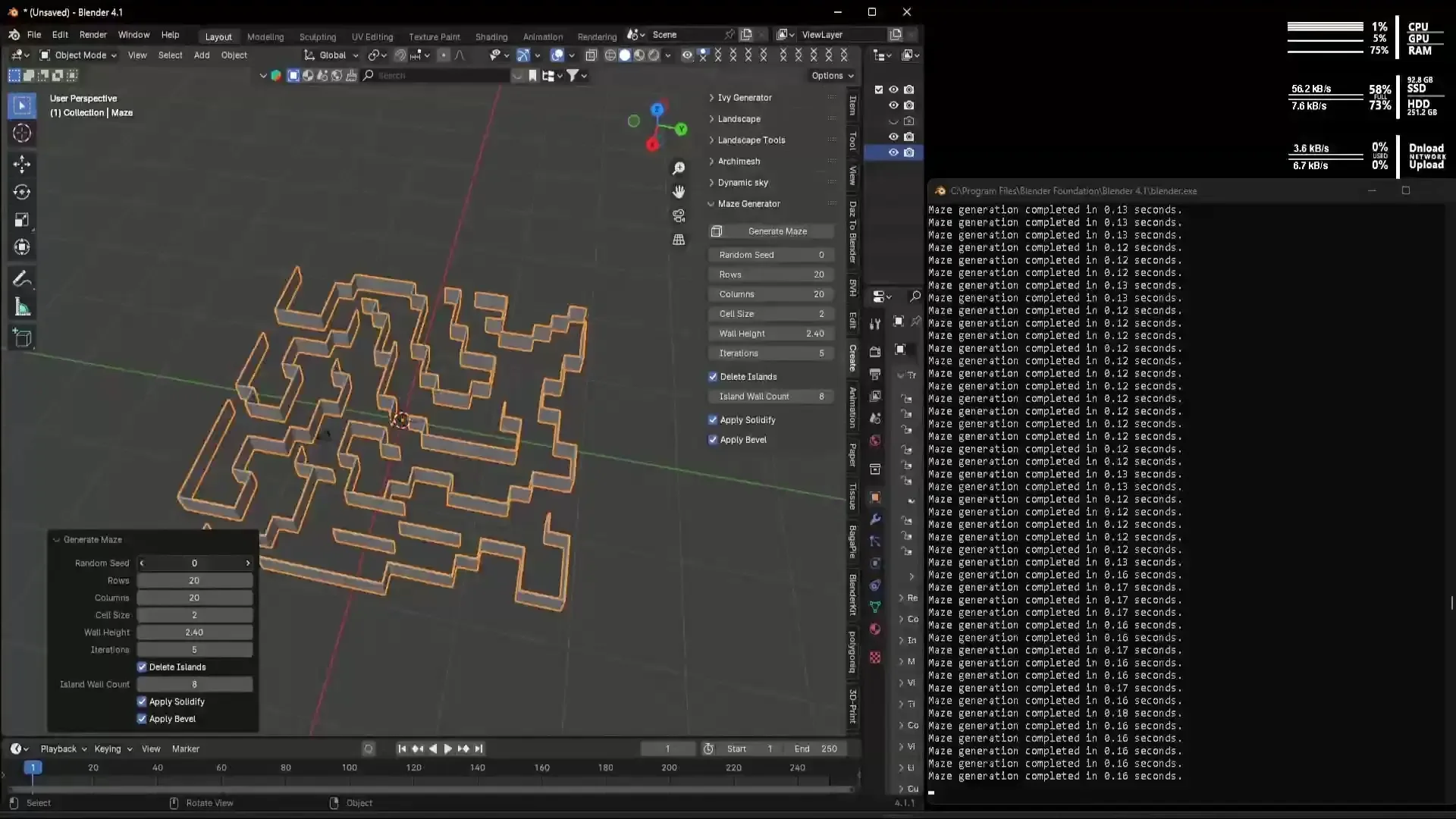
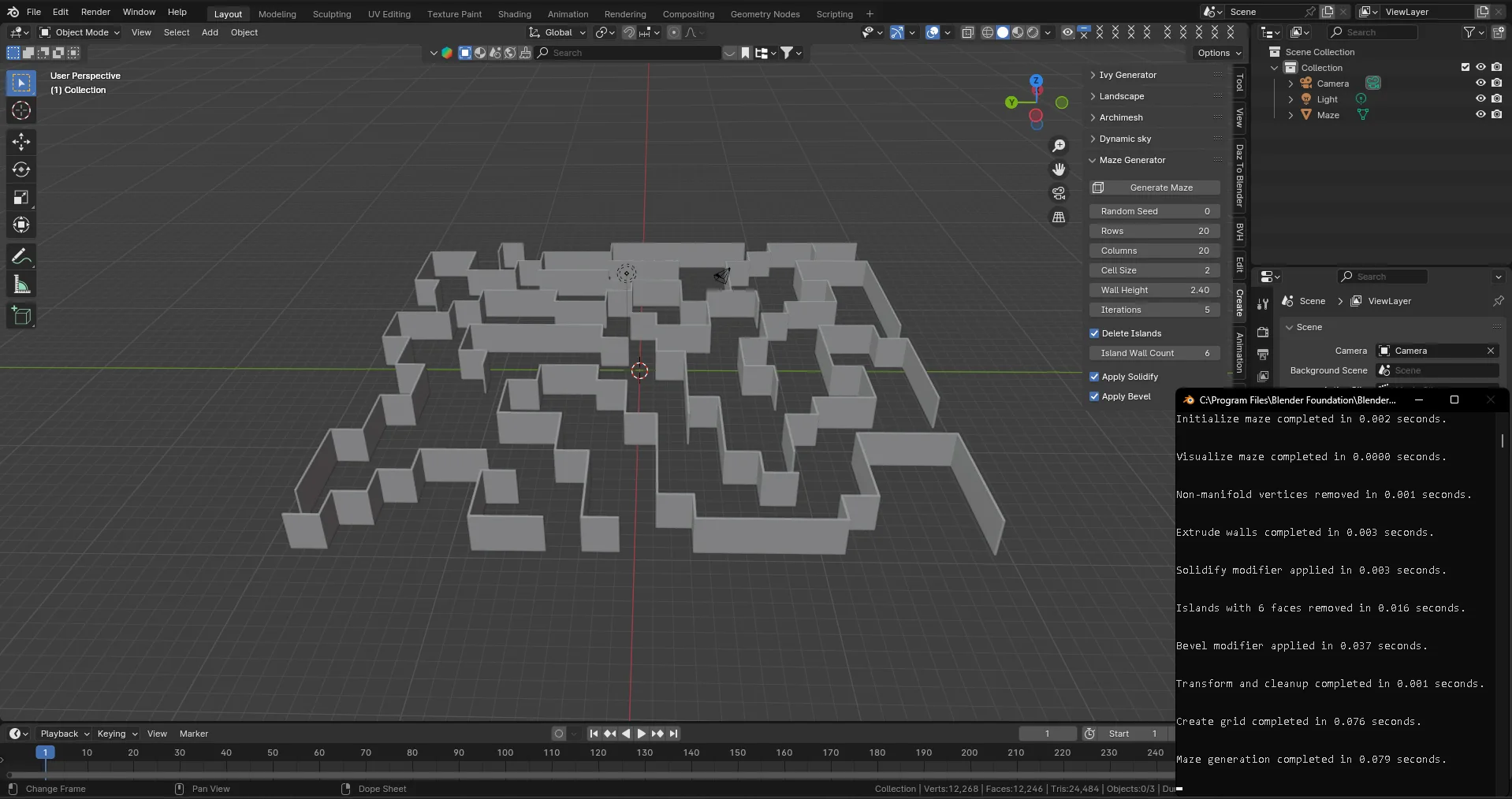
A Maze generator extension for Blender.
Add-on by Leeroy-Majors
About What's New Reviews Version History
Demonstration Video Demonstration Image 0.2.5 Update

Description

***Please note: The support link for github on this page no longer works and did not update on upload of new version, I have lost access thanks to the Microsoft Authenticator. For support requests email me or visit https://github.com/ljsau/Blender-Maze-Generator - Apologies for this error. I moved from Android to iPhone and the Microsoft Authenticator keeps invalidating 2FA on all kinds of places every few weeks ever since.

The Maze Generator is a Blender add-on designed to create customizable, random maze meshes within Blender. This tool is ideal for users in game development, architectural visualization, or artistic projects who need to quickly generate complex mazes with various configurations.

Features

  • Random Maze Generation — Generate mazes with customizable dimensions and properties. Users can adjust parameters such as rows, columns, cell size, and wall height to vary the complexity and size of the maze.
  • Solidify Modifier — Optionally apply a solidify modifier to give thickness to maze walls, enhancing the 3D appearance.
  • Bevel Modifier — Optionally apply a bevel modifier to smooth out the edges of the maze walls, providing a more polished look.
  • Floor & Ceiling — Optionally add a floor and a ceiling when the maze is generated. Each is created as its own object, so you can give it its own material or remove it independently.
  • Boundary Walls — Optionally enclose the maze in an outer wall frame, pushed out from the maze edge by an adjustable number of cells, turning the maze into a self-contained room.
  • Entrance & Exit — Optionally cut entrance and exit openings into the boundary to define start and end areas. Place each opening by choosing a wall (North, South, East, or West) and a position along it, from one corner through the centre to the other — both openings can even share a wall.

Randomise Entrance and Randomise Exit buttons move a door to a random spot on the opposite wall and rebuild instantly, so you can shuffle until you like it.

  • Advanced Configuration Options — Includes settings for random seed input, allowing users to reproduce specific mazes consistently. Additional controls for deleting isolated sections ("islands") of the maze and adjusting the complexity through iterations.
  • Real-time Updates — Adjust maze parameters in real-time from the Blender UI, with immediate visual feedback in the 3D view.

How to Use

  1. Install the add-on in Blender.
  2. Navigate to the Sidebar > Create tab in the 3D View.
  3. Adjust the maze parameters in the Maze Generator panel located at the bottom left of the

viewport: - Rows and Columns — Adjust the subdivision level of the grid on the X and Y axis to control the number of walls. - Cell Size — Modifies the overall size of the maze. - Wall Height — Controls the height of the maze walls. - Environment Options — Optionally add a floor, ceiling, and boundary walls, and cut an entrance and exit into the boundary at the positions you choose. 4. Click the Generate Maze button to create new mazes with your current settings. 5. Further customize the generated maze by modifying materials or applying additional Blender modifiers for enhanced visual effects. Each part (maze, floor, ceiling, and boundary) is a separate object, so you can assign each its own material in the shader editor.

Compatibility

Blender 4.2+ (Untested on earlier versions)


What's New

0.3.1 June 14th, 2026

Removed old GitHub account links (no longer accessible, thanks to Microsoft's authenticator, protip folks, use text message as 2FA instead! ) - Updated website for now until I create a new one.

See all versions


Permissions

This extension does not require special permissions.

Developer
Leeroy-Majors
Rating
(7)
Version
0.3.1
Updated
1 d
Published
May 31st, 2024
Downloads
27551
Size
27.8 KB
Compatibility
Blender 4.2 LTS and newer
Website
scinet3d.au
Report Issues
github.com/lshawau/Blender-Maze-Generator
License
GNU General Public License v3.0 or later
Add Mesh
...or download and Install from Disk
  • 27.8 KB

Reviews

See all
  • Syther37
  • v0.2.5
  • 1 w

It's amazing! i dont know if you're still actively working on this/ adding suggested features, but i wish that there's a way to add custom shapes as our walls. so i could make a wall look that i like and then assign the walls to be that with it's textures and everything.

that was the main suggestion, now these are not needed but would be lovely if added: 1- pre-made floor/celling upon the maze's creation 2- walls around the maze 3- assign beginning/goal in the maze so i can make an enter/exit area.

like i said these suggestions aren't needed as i can cosutmaize it by hand after the maze's creation but it'd be good to cut some time. amazing plugin sir

  • Leeroy-Majors replied
  • 1 w

Thank you so much — this kind of message is genuinely what keeps me working on it, and yes, I'm still actively adding to it!

Good news first: all three of your "would be lovely" extras are in as of v0.3.0:

  1. Floor & ceiling — optional, added automatically when you generate.
  2. Boundary walls — an outer frame around the maze, with adjustable spacing.
  3. Entrance & exit — you can cut openings into the boundary and place each one on whichever wall you like, anywhere along it, so you get a proper start/finish area. There are even "Randomise Entrance/Exit" buttons if you'd rather just roll the dice.

On your main request — custom wall shapes — I owe you an honest answer. That one's out of scope for now, and not because it isn't a great idea. The maze builds its walls by extruding the corridor layout, so to drop in a hand-modelled wall I'd have to rebuild the whole generator to place your mesh segment-by-segment and handle every corner and junction cleanly. It's a big rewrite with a lot of fiddly edge cases, and I didn't want to ship it half-baked.

But the part you're really after — making the walls look the way you want, textures and all — you can already do, and more easily than you'd think. Each piece now comes out as its own separate object (Maze, Floor, Ceiling, Boundary), so you can give each one its own material and build whatever you like in the shader editor — wallpaper, grime, glowing ceiling panels, the lot. That's the route I'd point you to for the custom look, and it'll get you there without waiting on the big rewrite.

Thanks again for taking the time to write all this up — it genuinely shaped this whole update.

  • Ben-Wade-1
  • v0.2.5
  • 6 mo

Absolutely amazing! I especially like that you can add islands/disjoints.

  • CHILDWOLF
  • v0.2.5
  • 9 mo

good

5.0

7 reviews
5
4
3
2
1
Rate this Add-on Report an issue
  • About
  • Privacy Policy
  • Terms of Service
About
  • Blender Foundation
  • Blender Institute
  • Blender Studio
  • License
  • Logo & Trademark
  • Credits
  • Privacy Policy
  • Code of Conduct
Organization
  • People
  • Jobs
Blender Network
Download
  • Latest Blender
  • Blender LTS
  • Previous Versions
  • Experimental Builds
  • Source Code
  • Requirements
  • Benchmark
  • Flamenco
Extensions
  • Add-ons
  • Themes
Developers
  • Get Started
  • Roadmap
  • Projects
  • Docs
  • Blog
  • Forum
  • YouTube
  • Python API
Blender Studio
  • Films
  • Training
  • Tools & Pipeline
Support
  • Manual
  • Community
  • FAQ
Get Involved
  • Documentation
  • Education
News
  • Press Releases
  • User Stories
Blender Conference
Follow Blender
Support Blender
  • Donate
  • One-time Donation
Artistic freedom starts with Blender The Free and Open Source 3D Creation Suite