Extensions
  • Home
  • Add-ons
  • Themes
  • Approval Queue
  • About
  • Upload Extension
  • Sign in
  • BLENDER.ORG

    • Download

      Get the latest Blender, older versions, or experimental builds.

    • What's New

      Stay up-to-date with the new features in the latest Blender releases.

    DEVELOPMENT

    • Roadmap

      See which projects are currently being worked on and what's next.

    • Documentation

      Guidelines, release notes and development docs.

    LEARNING & RESOURCES

    • Blender Studio

      Access production assets and knowledge from the open movies.

    • Manual

      Documentation on the usage and features in Blender.

    • Benchmark

      A platform to collect and share results of the Blender Benchmark.

    • Blender Conference

      The yearly event that brings the community together.

    DONATE

    • Development Fund

      Support core development with a monthly contribution.

    • One-time Donations

      Perform a single donation with more payment options available.

All Add-ons

Add-on Linkage Marking Menu
Linkage Marking Menu

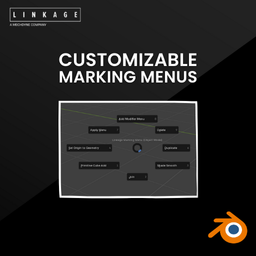
Customizable Marking Menu for Object and Edit modes.
Add-on by Linkage
About Reviews Version History

About

Take control of your Blender workflow with the Linkage Customizable Marking Menus! These intuitive quick-access menus let you activate tools directly in the viewport, saving time and eliminating the need for constant menu navigation. Fully customizable, they allow you to tailor your setup with your favorite tools or custom operators, making your workflow faster, smoother, and more efficient. Perfect for 3D artists and designers looking to boost productivity and stay in the creative flow.

User Guide

  1. Customize the marking menus in the add-on's preferences.
  2. Open the items drop-down menu and choose from preset tools or select Custom Operator.
  3. After selecting Custom Operator, you can search for a tool in the search bar.

Hotkeys

  1. Object Mode 1: Shift + Ctrl + Left mouse button
  2. Object Mode 2: Shift + Ctrl + Right mouse button
  3. Edit Mode: Shift + Ctrl + Left mouse button

What's New

No changelog for this release.


Permissions

This extension does not require special permissions.

Developer
Linkage
Rating
(1)
Version
1.0.5
Updated
10 mo
Published
Jan. 14th, 2025
Downloads
1665
Size
18.5 KB
Compatibility
Blender 4.2 LTS and newer
Website
linkage-d.com
Report Issues
github.com/Linkage-Design/MarkingMenu
License
GNU General Public License v3.0 or later
User Interface
...or download and Install from Disk
  • 18.5 KB

Reviews

See all
  • Ralph-Booger
  • v1.0.5
  • 3 mo

you really should not use hotkeys replacing so commonly used functions!

3.0

1 review
5
4
3
2
1
Rate this Add-on Report an issue
  • About
  • Privacy Policy
  • Terms of Service
About
  • Blender Foundation
  • Blender Institute
  • Blender Studio
  • License
  • Logo & Trademark
  • Credits
  • Privacy Policy
  • Code of Conduct
Organization
  • People
  • Jobs
Blender Network
Download
  • Latest Blender
  • Blender LTS
  • Previous Versions
  • Experimental Builds
  • Source Code
  • Requirements
  • Benchmark
  • Flamenco
Extensions
  • Add-ons
  • Themes
Developers
  • Get Started
  • Roadmap
  • Projects
  • Docs
  • Blog
  • Forum
  • YouTube
  • Python API
Blender Studio
  • Films
  • Training
  • Tools & Pipeline
Support
  • Manual
  • Community
  • FAQ
Get Involved
  • Documentation
  • Education
News
  • Press Releases
  • User Stories
Blender Conference
Follow Blender
Support Blender
  • Donate
  • One-time Donation
Artistic freedom starts with Blender The Free and Open Source 3D Creation Suite