 Keyboard Layout Emulation


Remap all your keyboard shortcuts to emulate QWERTY keyboard shortcuts on non-QWERTY keyboard layouts, as if Blender handled keyboard shortcuts based on scan codes rather than input characters.

Features
- Type text in your preferred layout while benefitting from Blender's default keyboard shortcuts.
- Remap keyboard shortcuts from all add-ons, not just Blender's shortcuts.
- Define your own keyboard layout using a simple editor, if the defaults don't suit you.
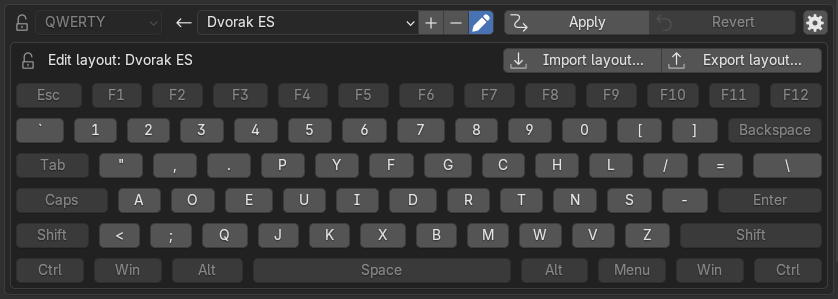
Layout emulation is reapplied whenever you restart Blender or install new add-ons to ensure that add-on keyboard shortcuts are reliably remapped.
Each remapped keyboard shortcut is tracked to avoid remapping it twice over by mistake.
Usage
- Navigate to
Preferences > Keymap. - Select your preferred input keyboard layout in the top dropdown selector.
- Click the
Applybutton next to it. - Observe how all keyboard shortcuts have been remapped. Shortcuts added by add-ons in the future will also be remapped.
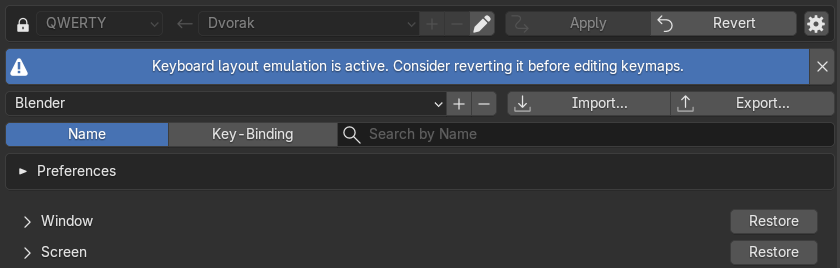
If you ever want to make changes to the keyboard layout or edit shortcuts manually, click the
Revert button to undo the emulation.
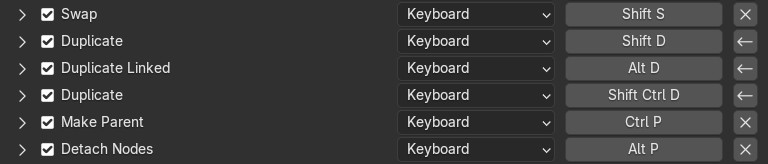
Some shortcuts (namely,
Node Editor > Duplicate) are a bit glitchy and will appear as user-modified even after reverting to their default.
If you notice this when you revert emulation, observe how their actual value has been correctly reverted. They are only incorrectly flagged as user-modified.
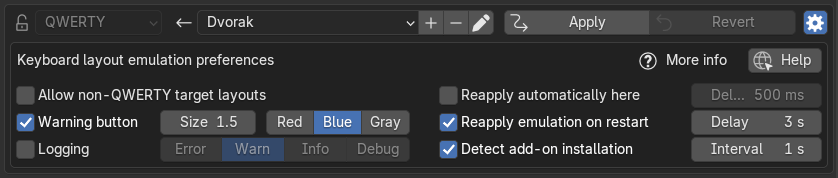
You can edit the add-on's preferences by clicking the gear icon on the top right.
See the user manual for more information.
What's New
1.0.4 April 18th, 2026
- Avoid logged exception on exit