 K-Tools: Sync | Lock Viewport
K-Tools: Sync | Lock Viewport
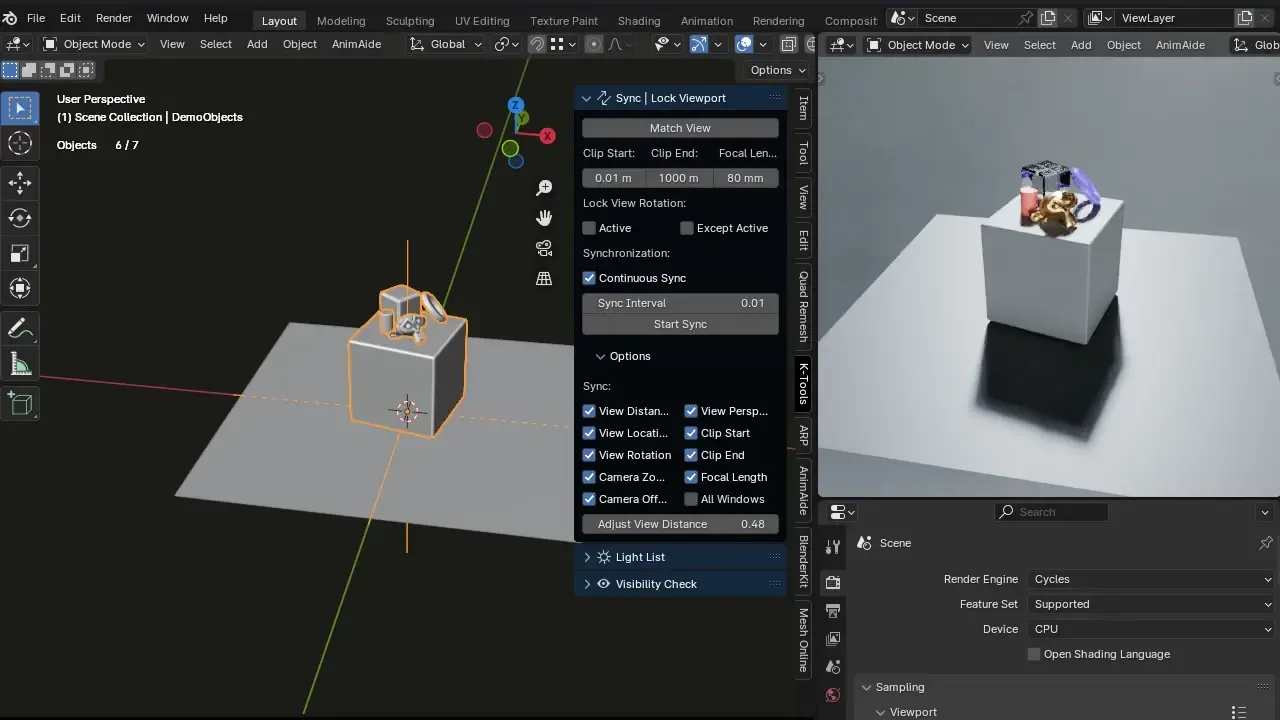
Addon Location: 3D View -> N-Panel -> K-Tools -> Sync | Lock Viewport
A powerful synchronization and analysis toolkit for Blender, designed for multi-monitor setups and complex scene reviewing. Sync navigation, lock specific rotations, or apply artistic shading presets across multiple viewports simultaneously.
🛠 View Synchronization Panel
Core Sync Controls
- Single Match: Synchronizes all selected views once.
- Real-time Sync: Constantly mirrors navigation (location, rotation, zoom) from the Master View to all selected targets.
- Customizable Refresh Rate: Adjust how often sync updates happen. Higher rates are smoother; lower rates save resources for heavy scenes.
- Master View Control: Choose which viewport is the "Driver". Use the Identify View button to see the unique ID of each window.
Advanced Master Logic
- Auto Master: Automatically switches the "Driver" to whichever viewport your mouse is currently hovering over. Perfect for fluid multi-window workflows.
- Set Current as Master: Instantly promotes the current viewport to be the Driver.
Smart View List
- Window Sections: Views are organized and stacked by Window ID for clear navigation in multi-monitor setups.
- Individual Toggles: Enable or disable synchronization for each viewport independently.
- Shading Presets: Apply specialized visual modes to specific viewports (e.g., one window in Wireframe, another in Silhouette).
⚙️ Sync Options (The "What" to Sync)
Access these via the Settings popover to customize exactly what data is shared between viewports:
- Navigation: Location, Rotation, Distance (Zoom), and Camera Offset.
- Camera Data: Focal Length (Lens), Perspective mode, and Camera Zoom.
- Viewport: Clip Start and Clip End.
- Distance Adjust: A multiplier to offset the zoom level of synced views relative to the Master.
🔒 Lock Rotation System
Switch to Lock View mode to freeze specific viewports into predefined angles:
- Presets: Top, Bottom, Right, Left, Front, Back, or Camera.
- Match Master: Locks the viewport to follow the Master's current rotation.
- Independent Control: Keep one view locked in "Top View" while navigating freely in another.
🎨 Shading Presets System
Analyze your models from multiple perspectives using specialized visual modes:
| Category | Presets | Best Used For... |
|---|---|---|
| Artistic | Silhouette, Silhouette Inv, Random Colors | Checking big-picture forms, silhouettes, and object separation. |
| Technical | Topology, Normals Check, X-Ray | Verifying edge flow, face orientation, and internal structures. |
| Surfacing | Zebra (H/V), High Detail | Surface continuity (Reflection analysis) and fine sculpt detail. |
[!TIP] Smart State Capture: The addon saves your original viewport settings (shading, overlays, gizmos) before applying a preset. Selecting "None" restores your setup exactly as it was.
📍 Local View (Upgraded)
An enhanced version of Blender's / (Numpad Slash) operator:
- Global Isolation: Isolates selected objects in all viewports simultaneously.
- Keep Lights: Option to keep lights visible even when isolating objects, essential for lighting-focused reviews.
🔧 Global Settings
Visit Edit > Preferences > Add-ons > K-Tools View Sync to:
- Enable/Disable Auto Master ON by default.
- Manage global addon behaviors.
Developed by Robert Kezives
Website/Support
What's New
2.8.1 May 15th, 2026
🚀 What's New
v2.8.1 (Stability & UX Update)
- Smart Session Persistence: Real-time Sync and Auto Master states are saved in
.blendfiles and restored on load. - Global Preferences: New menu in Addon Preferences to set defaults like "Auto Master ON".
- Auto-Refresh System: View List updates automatically when areas or windows change.
- Performance Optimized: "Heartbeat" system stops processing when the panel is hidden.
- Shading Presets System: Apply 10+ specialized visual analysis modes (Silhouette, Zebra, Normals, etc.) to individual viewports.
- Smart State Capture: Viewports remember their original shading/overlays and restore them when a preset is turned off.
- Upgraded Local View: Isolate objects across all active 3D views simultaneously.
- GPU Identify System: Enhanced text overlays to easily identify View IDs in complex layouts.
- Multi-Window Support: Full synchronization support for viewports in separate Blender windows.
Fantastic add-on! I use it to load a reference scan in one viewport and my sculpting mesh in another. Lining them up gives me a perfectly synced reference that rotates exactly the way my sculpt mesh does. This has made my workflow so much easier — thank you for creating it!
As a very visual person, this addon is really cool! It's really nice to see the different viewports all on one screen in a much easier way (for me, anyways.)
My only gripe with this addon is that it takes away the object list. Also, this might just be me being semi-new to Blender, but I can't figure out how to turn it off and make the second window the addon creates go away with it.
Otherwise, keep up the great work! :)
This is too god! Thank you : )