Extensions
  • Home
  • Add-ons
  • Themes
  • Approval Queue
  • About
  • Upload Extension
  • Sign in
  • BLENDER.ORG

    • Download

      Get the latest Blender, older versions, or experimental builds.

    • What's New

      Stay up-to-date with the new features in the latest Blender releases.

    DEVELOPMENT

    • Roadmap

      See which projects are currently being worked on and what's next.

    • Documentation

      Guidelines, release notes and development docs.

    LEARNING & RESOURCES

    • Blender Studio

      Access production assets and knowledge from the open movies.

    • Manual

      Documentation on the usage and features in Blender.

    • Benchmark

      A platform to collect and share results of the Blender Benchmark.

    • Blender Conference

      The yearly event that brings the community together.

    DONATE

    • Development Fund

      Support core development with a monthly contribution.

    • One-time Donations

      Perform a single donation with more payment options available.

All Add-ons

Add-on EasyMesh Batch Exporter
EasyMesh Batch Exporter
Streamlined mesh export for game development workflows.
Add-on by spec-arte
About What's New Permissions Reviews Version History
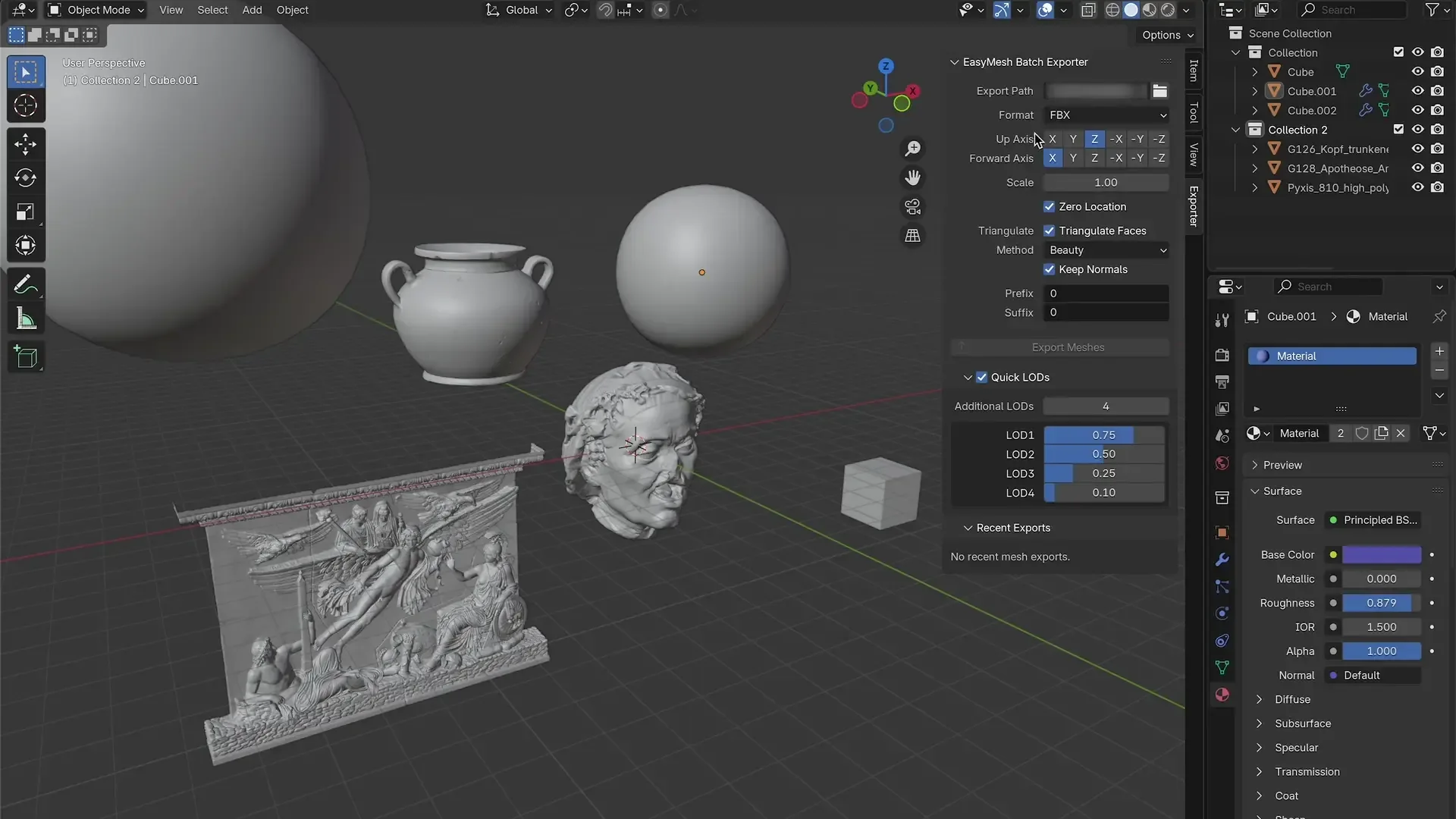
Video demo of EasyMesh batch export with LODs and import Export panel showing supported features Create up to 4 LOD levels and option to export as structured FBX hierarchy After export there are mutliple ways to track which objects have been exported

EasyMesh Batch Exporter

A professional-grade Blender addon designed for game development workflows. Streamlines 3D asset export with game engine naming conventions, LOD hierarchy export, geometry nodes optimisation, and automatic texture management, all whilst handling massive polygon counts without crashes.

What it does

Game Engine Integration & Multi-Format Export

  • Game Engine Naming Conventions: Built-in support for Unreal Engine (PascalCase), Unity (Capitalised_Words_With_Underscores), and Godot (snake_case) naming standards
  • LOD Hierarchy Export: Creates structured FBX hierarchies with LOD levels for Unity/Unreal workflows ({ObjectName}_LODGroup.fbx)
  • Export meshes, curves, and metaballs simultaneously with automatic mesh conversion
  • Supports FBX, OBJ, glTF/GLB, USD, and STL formats with format-specific optimisations
  • Individual object processing ensures each selected object gets its own LOD hierarchy (not merged)
  • Customisable file naming with prefixes and suffixes for organised asset libraries

Precision Transform & Coordinate Control

  • Configure Forward and Up axes for different target applications (Unity, Unreal, etc.)
  • Global scale adjustment with format-specific handling
  • Units conversion: seamless switching between metres and centimetres
  • Zero object location before export for consistent positioning
  • Automatic transform application with memory-safe processing

Advanced Mesh Processing & Geometry Nodes Support

  • Geometry Nodes Optimisation: Enhanced support for complex procedural workflows with smart detection, data layer preservation, and improved instance handling
  • Modifier Control: Choose which modifiers to apply (None/Visible/Render) for performance vs. quality balance
  • Triangulation: Multiple methods (Beauty, Fixed, Alternate, Shortest Diagonal) with normal preservation
  • Smoothing: Format-specific smoothing options (Face, Edge, Off) for optimal results
  • Memory Optimisation: Handles 2+ million polygon meshes without crashes
  • Enhanced Metaball Support: Auto-smooth shading with 30ยฐ threshold and improved material preservation

Automatic LOD Generation & Hierarchy Export

  • Creates up to 4 LOD levels using progressive decimation (faster processing and less memory usage)
  • Hierarchy Export Mode: Export LODs as structured FBX hierarchies compatible with Unity and Unreal Engine LOD systems
  • LOD objects properly named as {basename}_LOD00, {basename}_LOD01, etc. within _LODGroup.fbx files
  • Preserves symmetry along X, Y, or Z axis during decimation
  • Individual decimation ratios for each level (e.g., LOD1: 75%, LOD2: 50%)
  • Each LOD follows the same robust processing pipeline (modifiers, triangulation, etc.)

Intelligent Texture Management

  • Automatic Resizing: Textures scaled per LOD level (default: LOD1: 2K, LOD2: 1K, LOD3: 512px, LOD4: 256px)
  • Format Preservation: Maintains PNG for alpha channels, JPEG for RGB, HDR for high dynamic range
  • Normal Map Quality: Option to keep normal maps at higher resolution for visual quality
  • Compression Control: Adjustable lossy compression quality (0-100%) for size optimisation
  • Embed vs. External: Choose to embed textures in supported formats or save as external files
  • Aspect Ratio Protection: Maintains proportions to prevent texture distortion

Export Workflow & Feedback

  • Visual Indicators: Track recently exported objects with viewport colour coding
    • Green: Exported within the last minute (fresh)
    • Yellow: Exported within the last 5 minutes (stale)
  • Recent Exports Panel: Interactive list of exported objects with one-click selection
  • Memory Management: Automatic garbage collection for large mesh operations

Performance & Memory Optimisation

  • Automatically optimises for large meshes (>500K polygons)
  • Handles 2+ million polygon meshes without crashes
  • Progressive cleanup every 3 modifiers during heavy operations
  • Smart processing strategies based on mesh complexity

Common Use Cases

  • Game Development: Complete asset pipelines with game engine naming conventions and LOD hierarchy export for Unity/Unreal Engine
  • Procedural Assets: Geometry nodes-based meshes with complex attributes and instances properly preserved during export
  • Multi-Engine Projects: Switch between Godot (snake_case), Unity (Capitalised_Words), and Unreal (PascalCase) naming standards
  • Professional LOD Workflows: Export ready-to-import LOD groups that seamlessly integrate with game engine LOD systems
  • Architectural Visualisation: Export curves (pipes, railings) and meshes with consistent naming and scale conversion
  • Organic Modelling: Enhanced metaball-based characters with auto-smooth shading and material preservation
  • 3D Printing: STL export with precise scale control and unit conversion
  • Asset Libraries: Organised exports with game engine specific naming and texture optimisation

The addon preserves your original files whilst creating game-ready exports, giving you full control over naming conventions, LOD structures, and quality vs. file size trade-offs across multiple industry-standard formats.


What's New

1.5.0 November 8th, 2025

EasyMesh Batch Exporter v1.5.0 ๐Ÿš€

๐Ÿ“ TLDR

v1.5.0 adds two major workflow features:

  • Presets system: Save/load export configurations with built-in presets for Godot, Unity, and Unreal
  • Custom presets: Create and share team export standards via JSON files
  • glTF batch export: Combine multiple objects into a single file based on collection membership
  • Zero breaking changes: All existing workflows remain unchanged

๐ŸŽ‰ Major New Features

๐ŸŽฏ Presets System

Save and load your export configurations instantly

Speed up your workflow with ready-to-use presets for different game engines and projects. No more manually configuring dozens of settings each time you switch projects!

Built-In Game Engine Presets

Three preconfigured presets included:

  • ๐Ÿค– Godot Preset:

    • glTF/GLB format with batch export enabled
    • Snake_case naming convention
    • Optimised material export for Godot's PBR workflow
    • Automatic triangulation and mesh smoothing
  • ๐ŸŽฒ Unity Preset:

    • FBX format with embedded textures
    • Capitalised_Words_With_Underscores naming
    • Triangulation enabled for consistent rendering
    • Render modifiers applied automatically
  • ๐ŸŽฏ Unreal Preset:

    • FBX format with LOD hierarchy support
    • PascalCase naming with prefix preservation
    • Optimised smoothing for Unreal's rendering pipeline
    • Forward axis configured for UE5 standards

Custom Preset Creation

  • ๐Ÿ’พ Save Your Settings: Create unlimited custom presets for specific projects or asset types
  • โšก One-Click Loading: Switch between entire configurations instantly
  • ๐Ÿ“‹ Project Templates: Perfect for teams maintaining consistent export standards
  • ๐Ÿ”„ Version Control Friendly: Preset files are simple JSON for easy sharing via Git

๐Ÿค– glTF Batch Export (Godot Workflow)

Combine multiple objects into a single optimised file

Perfect for Godot developers who want clean, organised imports without dozens of individual files cluttering their project.

How It Works

  • ๐Ÿ“ฆ Smart Batching: Select multiple objects, export once, get a single glTF/GLB file
  • ๐Ÿท๏ธ Collection-Based Naming: Automatically names the file after the shared collection (e.g., "Trees" collection โ†’ trees.glb)
  • ๐ŸŽฏ Individual Processing: Each object still gets full processing pipeline (modifiers, LODs, triangulation)
  • ๐Ÿ”„ LOD Compatible: Generate LODs for each object and export everything together
  • ๐Ÿ’พ Memory Efficient: Reuses existing memory optimisation for large batches

Perfect For

  • ๐ŸŒณ Environment Assets: Export all trees, rocks, or props as single files
  • ๐Ÿ—๏ธ Modular Buildings: Combine building parts into unified assets
  • ๐ŸŽฎ Character Rigs: Export character with accessories as one file
  • โšก Scene Assembly: Batch export complete scene sections for Godot

Why These Features Matter

โฑ๏ธ Massive Time Savings

  • Switch from Godot to Unity workflow in one click instead of adjusting 20+ settings
  • Export entire collections in seconds instead of tedious one-by-one exports
  • Share team export standards via JSON presets instead of documentation

๐ŸŽฏ Zero-Configuration Workflows

  • Godot preset + Batch mode = Production-ready assets in under 30 seconds
  • Jump between game engines without memorising format requirements
  • Consistent results across your entire team

๐Ÿ—๏ธ Professional Pipeline

  • Version control your export configurations alongside your project
  • Document export standards as shareable preset files
  • Reduce human error with standardised configurations

๐Ÿ”ง Usage Examples

Quick Start with Presets

  1. Select your objects in the 3D viewport
  2. Open EasyMesh panel โ†’ Presets section
  3. Click "Godot" preset (or Unity/Unreal)
  4. Click "Export" - Done! โœ…

Godot Batch Workflow

  1. Organise objects into collections (e.g., "Trees", "Rocks")
  2. Load "Godot" preset (enables batch mode automatically)
  3. Select all objects in collection
  4. Export โ†’ Single trees.glb file with all objects and LODs
  5. Import into Godot and your scene tree is already organised!

Custom Preset for Your Studio

  1. Configure all your preferred export settings once
  2. Scroll to Presets section โ†’ Enter preset name (e.g., "Studio_Standard")
  3. Click "Save Preset"
  4. Share presets/Studio_Standard.json with your team via Git
  5. Everyone loads the same preset - instant consistency! ๐ŸŽฏ

Multi-Engine Projects

  • Working on Unreal? Load "Unreal" preset
  • Exporting reference for Unity? Load "Unity" preset
  • Prototyping in Godot? Load "Godot" preset
  • Same assets, different exports, zero reconfiguration

โœจ Bug Fixes & Improvements

Fixes

  • ๐Ÿ› Unreal Naming Convention: Fixed edge cases in PascalCase conversion handling Blender's default naming patterns
  • ๐Ÿงน Code Quality: High, medium, and low priority fixes improving stability and performance
  • ๐Ÿ“ Documentation: Updated README and added comprehensive ARCHITECTURE.md

Improvements

  • ๐ŸŽจ Better Defaults: Embed textures enabled by default for smoother FBX workflows
  • ๐Ÿ”„ Alphabetical Organisation: Naming conventions now sorted alphabetically in UI
  • ๐Ÿงฝ Metaball Smoothing: Enhanced auto-smooth application for metaball exports

๐Ÿ“‹ Compatibility & Upgrade Notes

  • โœ… Blender 4.2.0+: All features fully supported
  • ๐Ÿ”„ Zero Breaking Changes: Existing workflows continue unchanged
  • ๐Ÿ’พ Automatic Preset Creation: Built-in presets created automatically on first launch
  • ๐Ÿ“ Preset Location: Find your presets in [addon]/presets/ directory

This release is all about workflow efficiency! Share your custom presets or workflow improvements on GitHub Discussions. Found a bug? Report it here. ๐Ÿ™

See all versions


Permissions

This extension requests the following permission:

  • Files

    Export mesh files to the specified directory

Developer
spec-arte
Rating
(9)
Version
1.5.0
Updated
6 mo
Published
April 8th, 2025
Downloads
20044
Size
82.1ย KB
Compatibility
Blender 4.2 LTS and newer
Website
github.com/speculative-artefact/easymesh_batch_exporter/releases
Report Issues
github.com/speculative-artefact/easymesh_batch_exporter/issues
License
GNU General Public License v3.0 or later
Import-Export
...or download and Install from Disk
  • 82.1ย KB

Reviews

See all
  • 13x666
  • v1.5.0
  • 4 mo

The add-on works like a charm and does exactly what it claims to do, no complaints. Thanks a lot, awesome job!

  • Yip
  • v1.4.0
  • 7 mo

Amazing! very convenient and really helpful!

  • spec-arte replied
  • 6 mo

thanks for letting me know! any ideas or feature requests post them on GitHub

  • yiuken
  • v1.4.0
  • 7 mo

This tool helps a lot,huge thanks.but I encountered a problem when using it today. I donโ€™t know if my settings are wrong or something.When I export blender model using Easy Mesh Batch Exporter and import that fbx model into UE5๏ผˆBlender Version is 4.5,EasyMesh Batch Exporter Version is 1.4.0๏ผ‰somehow,the unit is always kept in meters.That causing my model to be very small in the engine,so I want to ask is if there is a solution.Because I tried all the settings on the units and scale panel,in the end,thank for the tool again.

  • spec-arte replied
  • 6 mo

hey thanks for letting me know, i know about this bug but i thought i had fixed it. can you update the add-on to v1.5.0 and double check if it's still importing incorectly? if it is please let me know by posting a bug on GitHub and i'll look into it further

5.0

9 reviews
5
4
3
2
1
Rate this Add-on Report an issue
  • About
  • Privacy Policy
  • Terms of Service
About
  • Blender Foundation
  • Blender Institute
  • Blender Studio
  • License
  • Logo & Trademark
  • Credits
  • Privacy Policy
  • Code of Conduct
Organization
  • People
  • Jobs
Blender Network
Download
  • Latest Blender
  • Blender LTS
  • Previous Versions
  • Experimental Builds
  • Source Code
  • Requirements
  • Benchmark
  • Flamenco
Extensions
  • Add-ons
  • Themes
Developers
  • Get Started
  • Roadmap
  • Projects
  • Docs
  • Blog
  • Forum
  • YouTube
  • Python API
Blender Studio
  • Films
  • Training
  • Tools & Pipeline
Support
  • Manual
  • Community
  • FAQ
Get Involved
  • Documentation
  • Education
News
  • Press Releases
  • User Stories
Blender Conference
Follow Blender
Support Blender
  • Donate
  • One-time Donation
Artistic freedom starts with Blender The Free and Open Source 3D Creation Suite