Extensions
  • Home
  • Add-ons
  • Themes
  • Approval Queue
  • About
  • Upload Extension
  • Sign in
  • BLENDER.ORG

    • Download

      Get the latest Blender, older versions, or experimental builds.

    • What's New

      Stay up-to-date with the new features in the latest Blender releases.

    DEVELOPMENT

    • Roadmap

      See which projects are currently being worked on and what's next.

    • Documentation

      Guidelines, release notes and development docs.

    LEARNING & RESOURCES

    • Blender Studio

      Access production assets and knowledge from the open movies.

    • Manual

      Documentation on the usage and features in Blender.

    • Benchmark

      A platform to collect and share results of the Blender Benchmark.

    • Blender Conference

      The yearly event that brings the community together.

    DONATE

    • Development Fund

      Support core development with a monthly contribution.

    • One-time Donations

      Perform a single donation with more payment options available.

All Add-ons

Add-on CSV Importer
CSV Importer
import csv data to meshes in Blender.
Add-on by Jan-Hendrik-Müller
About What's New Permissions Reviews Version History
Geospecial Full tutorial

CSV Importer

A simple and fast CSV file importer.

How to Use

Option 1: Drag and drop your CSV file directly into Blender’s viewport.

Option 2: Use the menu: File → Import → CSV

Using the Data

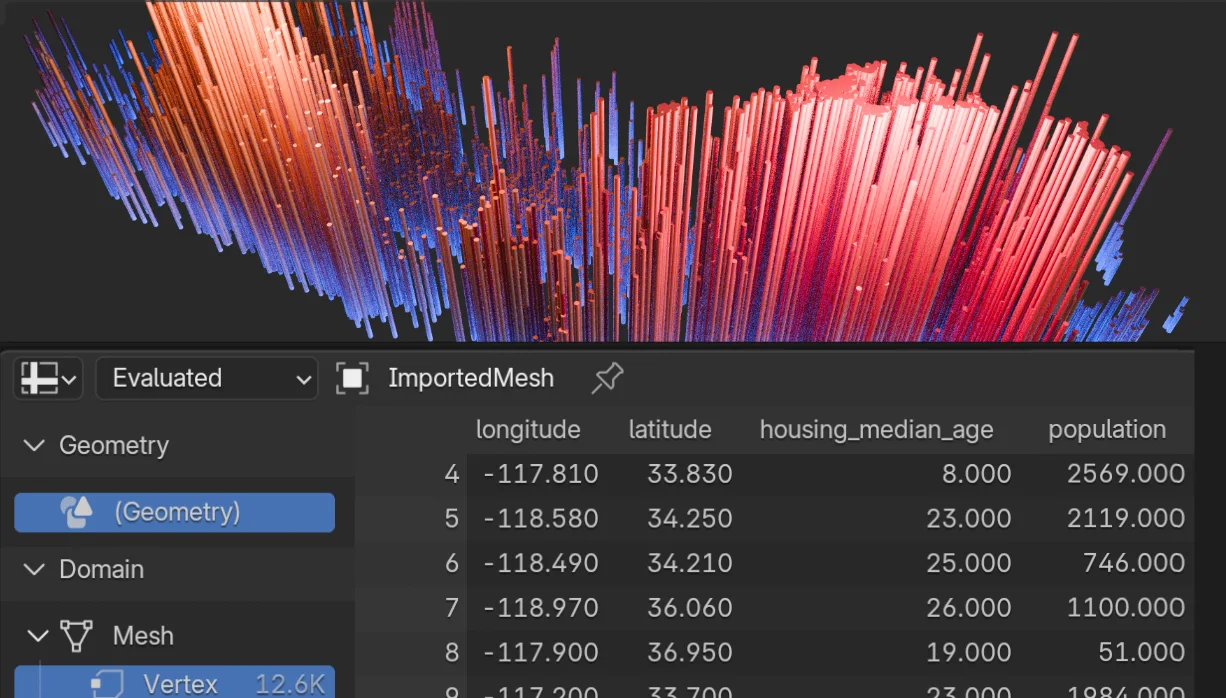
The imported data will be stored in a mesh.
The mesh consists of only vertices, with no faces and no edges.
All vertices are placed at the same point: the Origin (0,0,0).
Each vertex contains attributes from the imported data.
The data will appear in Blender’s Spreadsheet Editor.
Use Geometry Nodes and the Named Attribute feature to set new vertex positions based on the imported data.

Find additional documentation in the Github README.

Sample dataset download: data_california_housing_normalized.csv

If you see this message: "Extension bl_ext.blender_org.csv_importer is incompatible (This Python version (3.11) isn't compatible with (3.9)" , then update to Blender4.3 and it should work.

More info at: https://kolibril13.github.io/Table-at-Viz/


What's New

0.2.2 February 6th, 2026

See release notes: https://github.com/kolibril13/blender_csv_import/releases/tag/v0.2.2

See all versions


Permissions

This extension requests the following permission:

  • Files

    Importing data files from disk

Developer
Jan-Hendrik-Müller
Rating
(8)
Version
0.2.2
Updated
3 mo
Published
Dec. 9th, 2024
Downloads
18875
Compatibility
Blender 4.2.5 LTS and newer
Supported Platforms
  • macOS Apple Silicon
  • Windows
  • Linux
Website
github.com/kolibril13/blender_csv_import
Report Issues
github.com/kolibril13/blender_csv_import/issues
License
GNU General Public License v3.0 or later
Import-Export Geometry Nodes
Windows – 44.4 MB
...or download and Install from Disk
macOS - Apple Silicon – 39.2 MB
...or download and Install from Disk
Linux – 44.4 MB
...or download and Install from Disk
  • Windows 44.4 MB
  • macOS Apple Silicon 39.2 MB
  • Linux 44.4 MB

Reviews

See all
  • ray-32
  • v0.1.9
  • 10 mo

Hello. I'm working on a project that heavily relies on the CSV import geometry node in blender. But this node does not support relative pathing so as soon as any imput csv is moved, the absolute path is broken. Does this csv importer support relative pathing? If so, that would be great, as I am inexperienced in scripting blender myself.

  • Jan-Hendrik-Müller replied
  • 10 mo

Hi there! With this extension, once the CSV is drag'n'droped into the blender viewport, it will be embedded within the blender mesh, so there's no connection to the original data source anymore.

I assume you're using the new CSV Import node from Blender 4.5. It's not possible to use relative paths there, but you can use the string formatting node like this to have a bit more control on how to load the data: https://postimg.cc/hJ3BPF8h

  • Siddhartha-Kunti
  • v0.1.7
  • 1 y

Looks great but seem to have an issue in that: it installs and then is no longer visible in the import section upon restarting Blender? Am using V4.3.2. Any thoughts? Thanks!

  • Jan-Hendrik-Müller replied
  • 1 y

Can you describe more what you mean by "import section"? For me, the extension is shown in Preferences -> Add-ons. And this still works after a restart.

  • jdathela
  • v0.1.7
  • 1 y

Hi. This looks useful. Thank you for doing it. I have installed and activated the add-on, but it takes a long time to import any csv. At first, I thought that Blender froze, but I left it running for a few minutes and the data finally did import. That was using the sample data provided. It happens if I drag and drop the csv or import through file>import>csv. I'm running Blender 4.3.2. I've tried running a "repair" of Blender and reinstalling the addon, but the issue persists. Has anyone had this issue?

  • Jan-Hendrik-Müller replied
  • 1 y

I can confirm this is a bug in the latest version of the CSV Importer, caused by the new String processing feature. I just implemented a fix for it, and will probably release a new version tomorrow: https://github.com/kolibril13/blender_csv_import/pull/23

4.5

8 reviews
5
4
3
2
1
Rate this Add-on Report an issue
  • About
  • Privacy Policy
  • Terms of Service
About
  • Blender Foundation
  • Blender Institute
  • Blender Studio
  • License
  • Logo & Trademark
  • Credits
  • Privacy Policy
  • Code of Conduct
Organization
  • People
  • Jobs
Blender Network
Download
  • Latest Blender
  • Blender LTS
  • Previous Versions
  • Experimental Builds
  • Source Code
  • Requirements
  • Benchmark
  • Flamenco
Extensions
  • Add-ons
  • Themes
Developers
  • Get Started
  • Roadmap
  • Projects
  • Docs
  • Blog
  • Forum
  • YouTube
  • Python API
Blender Studio
  • Films
  • Training
  • Tools & Pipeline
Support
  • Manual
  • Community
  • FAQ
Get Involved
  • Documentation
  • Education
News
  • Press Releases
  • User Stories
Blender Conference
Follow Blender
Support Blender
  • Donate
  • One-time Donation
Artistic freedom starts with Blender The Free and Open Source 3D Creation Suite