
Extensions
  • Home
  • Add-ons
  • Themes
  • Approval Queue
  • About
  • Upload Extension
  • Sign in
  • BLENDER.ORG

    • Download

      Get the latest Blender, older versions, or experimental builds.

    • What's New

      Stay up-to-date with the new features in the latest Blender releases.

    DEVELOPMENT

    • Roadmap

      See which projects are currently being worked on and what's next.

    • Documentation

      Guidelines, release notes and development docs.

    LEARNING & RESOURCES

    • Blender Studio

      Access production assets and knowledge from the open movies.

    • Manual

      Documentation on the usage and features in Blender.

    • Benchmark

      A platform to collect and share results of the Blender Benchmark.

    • Blender Conference

      The yearly event that brings the community together.

    DONATE

    • Development Fund

      Support core development with a monthly contribution.

    • One-time Donations

      Perform a single donation with more payment options available.

All Add-ons

Add-on Controller Link
Controller Link
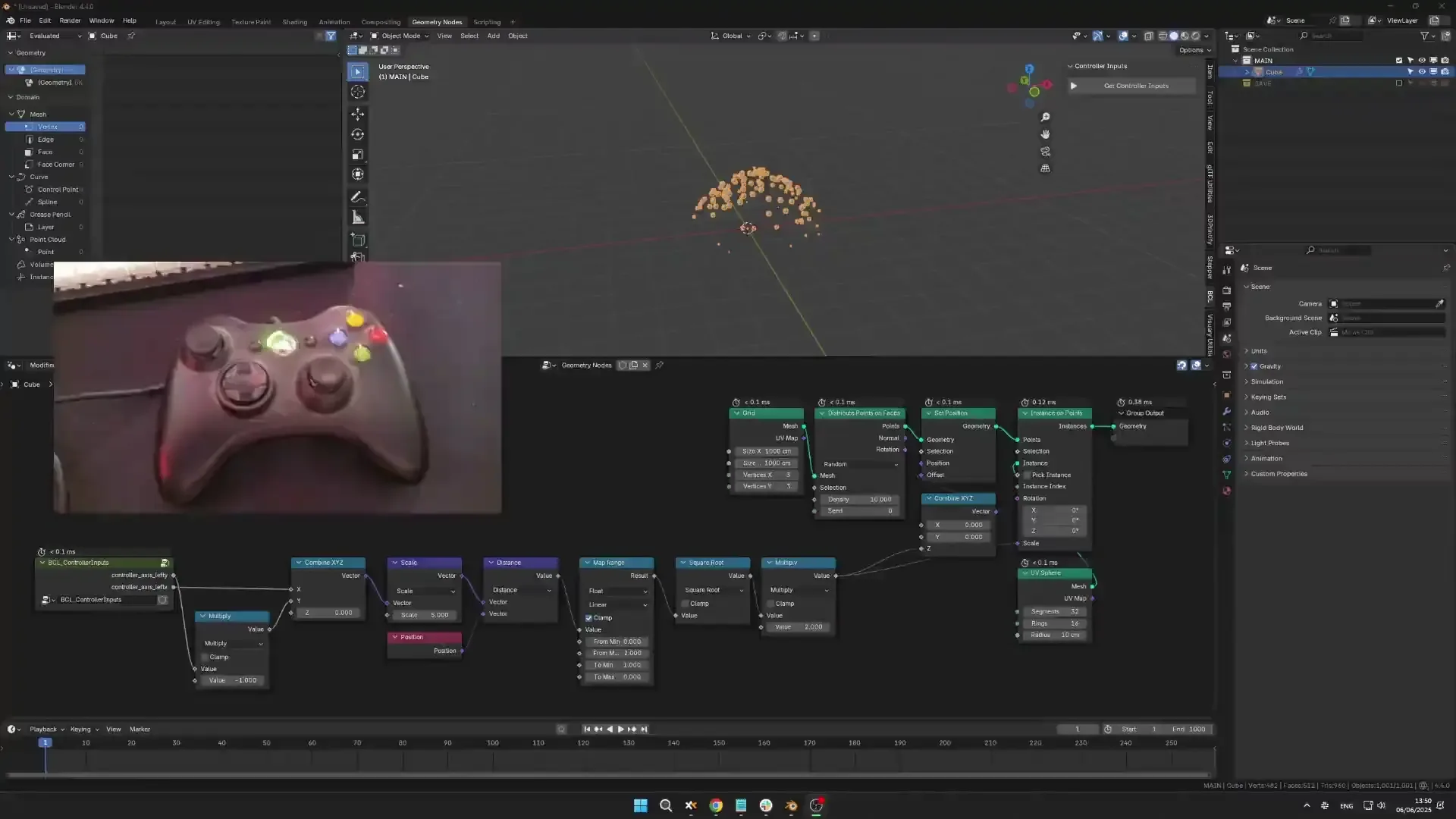
Use a gamepad as input.
Add-on by globglob3D
About What's New Reviews Version History

Controller Link is an add-on that lets you use a game controller or gamepad as a real-time input device. It turns controller inputs into animatable properties that can drive bones, geometry nodes, object transforms, and more — enabling intuitive, physical control for animation, rig testing, live performances, and procedural systems.

What makes Controller Link special is it's ability to record inputs into keyframes, it's nodegroup that allow using it in Geometry Nodes, and the fact that it work out of the box with any controller, on Windows, Mac, and Linux.

Features:

  • Use gamepad joysticks and buttons as Blender inputs
  • Record inputs
  • Link to Geometry Nodes using the CL nodegroup
  • Works with any gamepad on Windows, Mac, and Linux

How to use:

  • Go the Controller Link tab and click the button to get your controller inputs.
  • Drivers: Right click a controller input property, copy as driver, and right click any property that you want driven by this input and Paste Driver.
  • GN: Just add the Controller Link node group to your tree.

You can record inputs if you wish. Once you record your inputs, you can use the Bake Animation operator (native to Blender) to keep that recording and be able to make a new one without overriding your work.


What's New

1.0.1 June 19th, 2025

fixed bcl bug

See all versions


Permissions

This extension does not require special permissions.

Developer
globglob3D
Rating
(3)
Version
1.0.1
Updated
1 y
Published
June 10th, 2025
Downloads
6223
Size
15.5 MB
Compatibility
Blender 4.2 LTS and newer
Report Issues
github.com/globglob3D/Blender_Controller_Link/issues
License
GNU General Public License v3.0 or later
Animation Sequencer
...or download and Install from Disk
  • 15.5 MB

Reviews

See all
  • Master_CS2
  • v1.0.1
  • 6 d

Awesome job mate!

  • Pedro-Shell
  • v1.0.1
  • 9 mo

EXCELENTE, FUNCIONA PERFECTO

  • Nuno-Sousa
  • v1.0.1
  • 11 mo

works great, it could have some documentation to help set up drivers on other parts of blender, but this is awesome

5.0

3 reviews
5
4
3
2
1
Rate this Add-on Report an issue
  • About
  • Privacy Policy
  • Terms of Service
About
  • Blender Foundation
  • Blender Institute
  • Blender Studio
  • License
  • Logo & Trademark
  • Credits
  • Privacy Policy
  • Code of Conduct
Organization
  • People
  • Jobs
Blender Network
Download
  • Latest Blender
  • Blender LTS
  • Previous Versions
  • Experimental Builds
  • Source Code
  • Requirements
  • Benchmark
  • Flamenco
Extensions
  • Add-ons
  • Themes
Developers
  • Get Started
  • Roadmap
  • Projects
  • Docs
  • Blog
  • Forum
  • YouTube
  • Python API
Blender Studio
  • Films
  • Training
  • Tools & Pipeline
Support
  • Manual
  • Community
  • FAQ
Get Involved
  • Documentation
  • Education
News
  • Press Releases
  • User Stories
Blender Conference
Follow Blender
Support Blender
  • Donate
  • One-time Donation
Artistic freedom starts with Blender The Free and Open Source 3D Creation Suite