
Extensions
  • Home
  • Add-ons
  • Themes
  • Approval Queue
  • About
  • Upload Extension
  • Sign in
  • BLENDER.ORG

    • Download

      Get the latest Blender, older versions, or experimental builds.

    • What's New

      Stay up-to-date with the new features in the latest Blender releases.

    DEVELOPMENT

    • Roadmap

      See which projects are currently being worked on and what's next.

    • Documentation

      Guidelines, release notes and development docs.

    LEARNING & RESOURCES

    • Blender Studio

      Access production assets and knowledge from the open movies.

    • Manual

      Documentation on the usage and features in Blender.

    • Benchmark

      A platform to collect and share results of the Blender Benchmark.

    • Blender Conference

      The yearly event that brings the community together.

    DONATE

    • Development Fund

      Support core development with a monthly contribution.

    • One-time Donations

      Perform a single donation with more payment options available.

All Add-ons

Add-on Cameraide
Cameraide

Camera specific Resolution, Frame Range, Output Path & Format.
Add-on by longiy
About What's New Reviews Version History

Cameraide - Camera Settings Manager for Blender

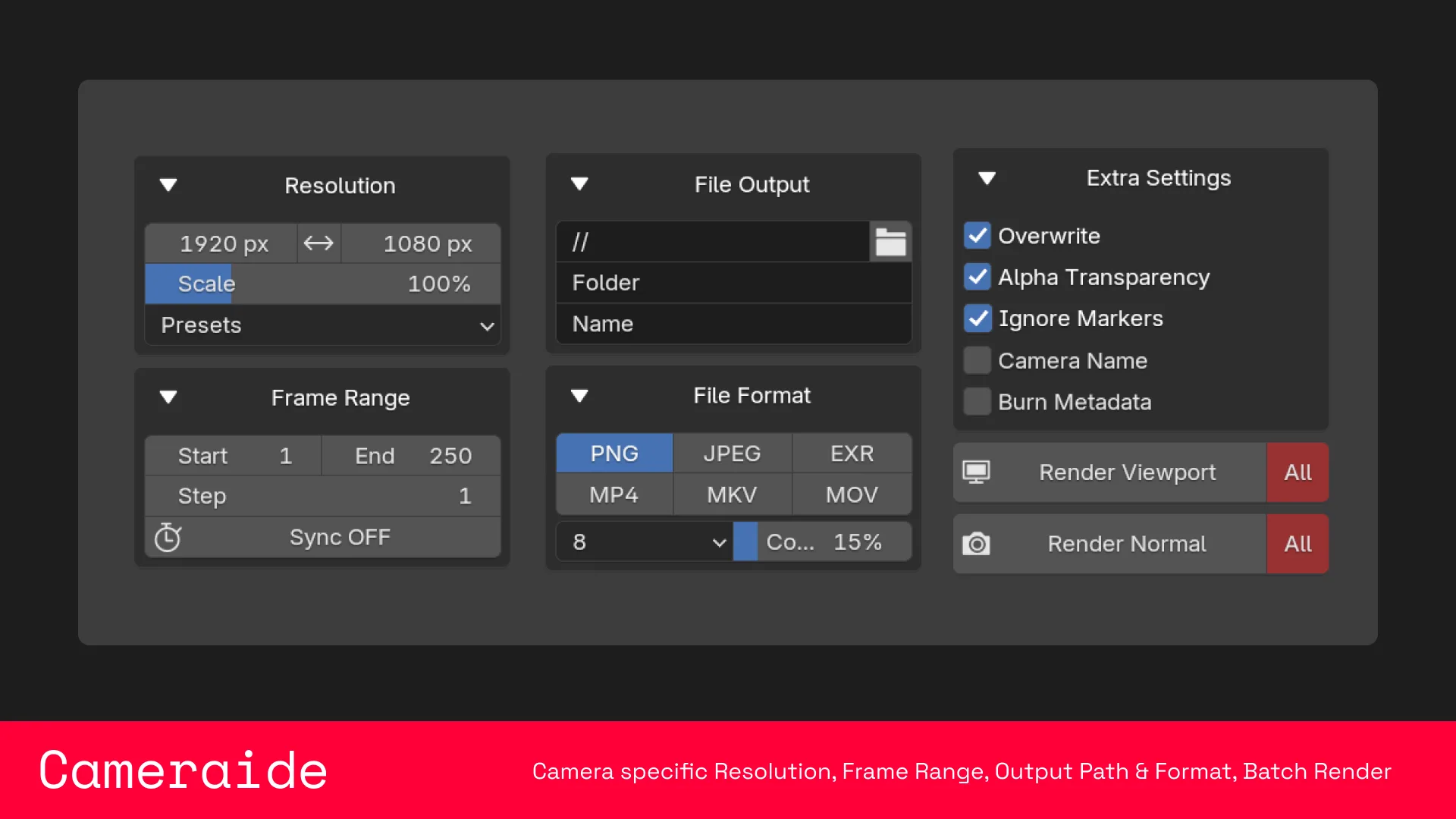
Each camera stores its own resolution, frame range, output path, and file format. Switch cameras — settings switch with them.

Version: 1.0.8 | Requires: Blender 4.3+


Quick Start

  1. Select a camera in the 3D View, open the Camera sidebar tab.
  2. Click the camera name button to enable Cameraide for it.
  3. Set up resolution, frame range, output, and format.
  4. Hit Snapshot, Playblast, or All Cameras to render.

Features

Camera Management

  • Each camera keeps its own settings independently
  • Camera list in the panel — click any camera to select it
  • Enable or disable Cameraide per camera at any time

Resolution

  • Custom width, height, and percentage per camera
  • One-click swap between landscape and portrait
  • Presets for common formats (HD, 4K, Square, Anamorphic, etc.)

Frame Range

  • Custom start, end, and step per camera
  • Optional sync to the scene timeline
  • Timeline Markers mode: reads frame ranges from markers assigned to the camera

File Output

  • Custom output path, subfolder, and filename per camera
  • Optionally include the camera name in the filename
  • Toggle to skip re-rendering frames already on disk

File Format

  • Image: PNG, JPEG, OpenEXR
  • Video: MP4, MKV, MOV (ProRes)
  • Per-format quality settings (bit depth, compression, bitrate, etc.)
  • Transparent background toggle
  • Audio codec and bitrate for video formats

Rendering

  • Snapshot — single frame, viewport or normal renderer
  • Playblast — full animation, viewport or normal renderer
  • All Cameras — batch renders every enabled camera in sequence

What's New

1.1.0 June 19th, 2026

ProRes XQ defaulting fix

See all versions


Permissions

This extension does not require special permissions.

Developer
longiy
Rating
(9)
Version
1.1.0
Updated
1 w
Published
Sept. 20th, 2024
Downloads
12586
Size
66.9 KB
Compatibility
Blender 4.3 and newer
Report Issues
github.com/longiy/Cameraide
License
GNU General Public License v3.0 or later
Render Camera
...or download and Install from Disk
  • 66.9 KB

Reviews

See all
  • Steve-Jc
  • v1.0.7
  • 3 w

finesse

  • okuma_10
  • v1.0.7
  • 3 w

Perfect for what I was doing.

  • Blendoro
  • v1.0.6
  • 3 mo

Very good addon. But does unfortunately not work with render queue /batch render plugins. Other than that it makes your life easier.

Is there a possibility to add a render queue to the plugin?

5.0

9 reviews
5
4
3
2
1
Rate this Add-on Report an issue
  • About
  • Privacy Policy
  • Terms of Service
About
  • Blender Foundation
  • Blender Institute
  • Blender Studio
  • License
  • Logo & Trademark
  • Credits
  • Privacy Policy
  • Code of Conduct
Organization
  • People
  • Jobs
Blender Network
Download
  • Latest Blender
  • Blender LTS
  • Previous Versions
  • Experimental Builds
  • Source Code
  • Requirements
  • Benchmark
  • Flamenco
Extensions
  • Add-ons
  • Themes
Developers
  • Get Started
  • Roadmap
  • Projects
  • Docs
  • Blog
  • Forum
  • YouTube
  • Python API
Blender Studio
  • Films
  • Training
  • Tools & Pipeline
Support
  • Manual
  • Community
  • FAQ
Get Involved
  • Documentation
  • Education
News
  • Press Releases
  • User Stories
Blender Conference
Follow Blender
Support Blender
  • Donate
  • One-time Donation
Artistic freedom starts with Blender The Free and Open Source 3D Creation Suite