 Path Maker
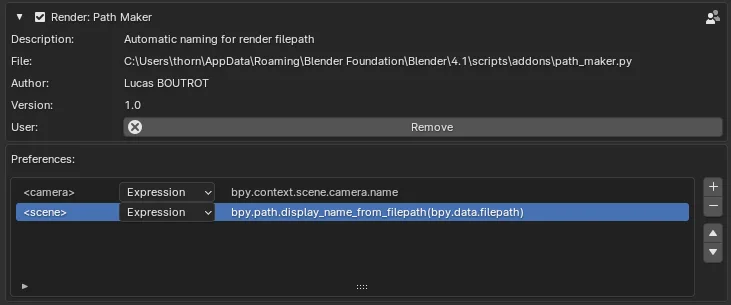

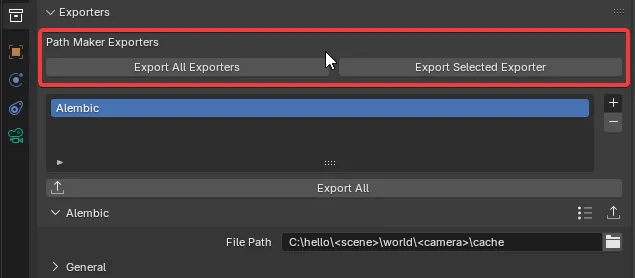
The "Path Maker" add-on allows you to write tags in some output paths. Tags will be replace at render time by a string generated with a line of code, a python script or an hardcoded string.
The addon can be used with CLI with the --addons flag:
blender -b /path/to/file.blend --addons blender_path_maker
It supports:
- The "Output Path" in the output properties panels
- The "Base Path" in the file output compositor nodes
- The "filepath" in the collection exporters (you'll have to use the Path Maker buttons to make it work though)
Tag Type dropdown:
- Expression: single line python expression (example:
bpy.context.scene.name) - Path: Hard coded path (example:
toto\hello\world) - Script: Path to a python script that will be interpreted (the script has to print the value)
For example:
The tag (filename) can be replace by bpy.path.display_name_from_filepath(bpy.data.filepath) so that an Output Path like C:/hello/(filename)/world will now be C:/hello/file_name/world.
Example for a script:
import bpy

def run():
    version = bpy.app.version_string
    return version
The python script has to have a function definition named run that returns a string.
What's New
1.4.5 March 18th, 2026
- Remove prints during rendering
- Fix Blender crash during render, even when the addon is not used
I really like that addon, since it makes Output Paths behave like Maya and it should be Standard.
At first it worked. After Rendering an Animation in Evee it replaced the Token with the full output path.
Afterward it didn´t work anymore. I get the error message "could not open file for Rendering".
This workflow should be standard in Blender. I really hope the dev make it happen
Brilliant extension, should be in the default install. Would like a little more documentation, e.g. how to use scripts vs expressions (I'm thinking that's what I need to do to use regex, e.g. to get the version number of a project file, but I'm having to guess how to do it). Thanks for the help with the CLI rendering!