
Extensions
  • Home
  • Add-ons
  • Themes
  • Approval Queue
  • About
  • Upload Extension
  • Sign in
  • BLENDER.ORG

    • Download

      Get the latest Blender, older versions, or experimental builds.

    • What's New

      Stay up-to-date with the new features in the latest Blender releases.

    DEVELOPMENT

    • Roadmap

      See which projects are currently being worked on and what's next.

    • Documentation

      Guidelines, release notes and development docs.

    LEARNING & RESOURCES

    • Blender Studio

      Access production assets and knowledge from the open movies.

    • Manual

      Documentation on the usage and features in Blender.

    • Benchmark

      A platform to collect and share results of the Blender Benchmark.

    • Blender Conference

      The yearly event that brings the community together.

    DONATE

    • Development Fund

      Support core development with a monthly contribution.

    • One-time Donations

      Perform a single donation with more payment options available.

All Add-ons

Add-on B SubEditor
B SubEditor
Sync subtitles in Text Editor/VSE.
Add-on by Dinesh007
About What's New Permissions Reviews Version History

B-Sub Editor

Blender Software License

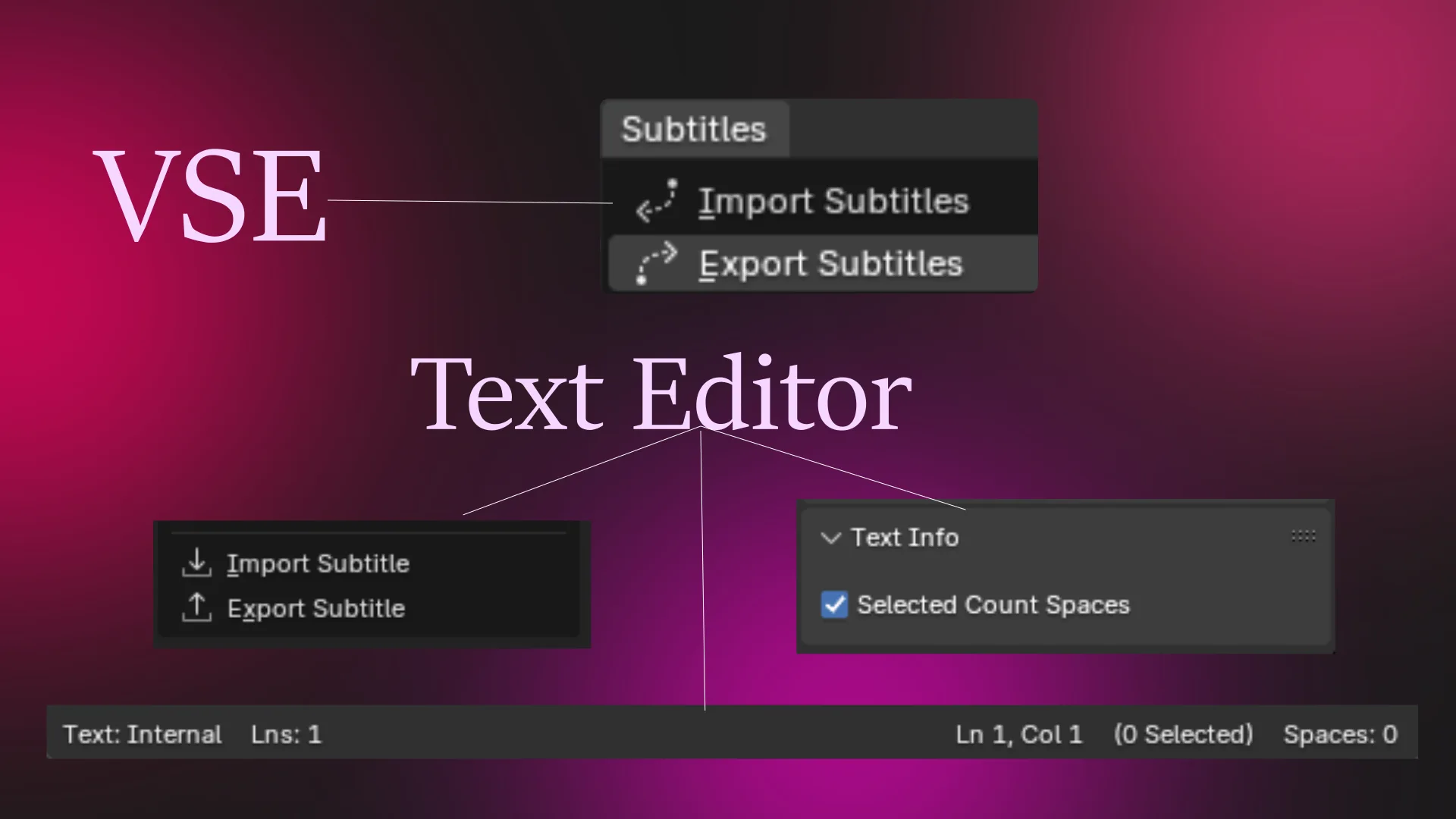
Addon designed to streamline subtitle management within the Text Editor and Video Sequence Editor (VSE). It simplifies the process of importing, exporting, and synchronizing subtitles in various formats, including SRT, VTT, SBV, and plain TXT. In the Text Editor, it provides convenient import and export operations, along with a helpful footer displaying text information like line count, cursor position, and selected character count. Within the VSE, B-Sub Editor facilitates the creation of text strips from subtitle files, enabling precise synchronization with video content. This addon aims to enhance the workflow for video editors and content creators who require precise subtitle control within Blender.

How to Use:

Text Editor Usage:

  • Importing Subtitles:
    1. Open a Text Editor window.
    2. In the Text Editor header, go to Text > Import Subtitle.
    3. Select the subtitle file you want to import (.srt, .vtt, .sbv, .txt).
    4. The subtitle content will be imported into a new text block.
  • Exporting Subtitles:
    1. Ensure the Text Editor contains the subtitle content you wish to export.
    2. In the Text Editor header, go to Text > Export Subtitle.
    3. Choose the desired subtitle format (SRT, VTT, SBV).
    4. Select a location to save the exported file.
  • Text Information Footer: The footer of the Text Editor displays useful information about the current text block, including: * Total number of lines. * Cursor position (line and column). * Number of selected characters (with an option to include or exclude spaces in the count, controlled by a checkbox in the Text Info panel in the Text Editor's Properties Region). * Indentation spaces of the current line.

VSE Usage:

  • Importing Subtitles (from Text Editor):
    1. Open a Text Editor and import your subtitle file as described above.
    2. Open the VSE.
    3. In the VSE menu bar, go to Add > Subtitles > Import Subtitles.
    4. In the pop-up dialog:
      • Select the text block containing the subtitles.
      • Choose the target VSE channel for the text strips.
      • Check the "Connect Strips" box to automatically connect the created strips end-to-end.
    5. Click OK. Text strips representing the subtitles will be added to the VSE.
  • Exporting Subtitles (from VSE):
    1. In the VSE, select the text strips you want to export.
    2. In the VSE menu bar, go to Add > Subtitles > Export Subtitles.
    3. The selected subtitles will be exported to a new text block in the Text Editor in SRT format.

What's New

1.0.1 January 17th, 2026

Blender 5.0 API compatibility

See all versions


Permissions

This extension requests the following permission:

  • Files

    Requires access to directory with subtitle files

Developer
Dinesh007
Rating
(1)
Version
1.0.1
Updated
5 mo
Published
Dec. 13th, 2024
Downloads
7299
Size
6.2 KB
Compatibility
Blender 5.0 and newer
Website
github.com/Dinesh0N
Report Issues
github.com/Dinesh0N/B_SubEditor/tree/main
License
GNU General Public License v3.0 or later
Import-Export Sequencer Text Editor
...or download and Install from Disk
  • 6.2 KB

Reviews

See all
  • NicolasPriniotakis
  • v1.0.0
  • 1 y

Thank you for creating this cool addon. A few years ago, I created an addon called blender-sub, and I think both our script would work really well together. I invite you to check out the demo of blender-sub. Would you be interested in exploring the possibility of merging them?

--> https://www.youtube.com/watch?v=rHjGF1g5gh8

  • Dinesh007 replied
  • 5 mo

👍

5.0

1 review
5
4
3
2
1
Rate this Add-on Report an issue
  • About
  • Privacy Policy
  • Terms of Service
About
  • Blender Foundation
  • Blender Institute
  • Blender Studio
  • License
  • Logo & Trademark
  • Credits
  • Privacy Policy
  • Code of Conduct
Organization
  • People
  • Jobs
Blender Network
Download
  • Latest Blender
  • Blender LTS
  • Previous Versions
  • Experimental Builds
  • Source Code
  • Requirements
  • Benchmark
  • Flamenco
Extensions
  • Add-ons
  • Themes
Developers
  • Get Started
  • Roadmap
  • Projects
  • Docs
  • Blog
  • Forum
  • YouTube
  • Python API
Blender Studio
  • Films
  • Training
  • Tools & Pipeline
Support
  • Manual
  • Community
  • FAQ
Get Involved
  • Documentation
  • Education
News
  • Press Releases
  • User Stories
Blender Conference
Follow Blender
Support Blender
  • Donate
  • One-time Donation
Artistic freedom starts with Blender The Free and Open Source 3D Creation Suite