
Extensions
  • Home
  • Add-ons
  • Themes
  • Approval Queue
  • About
  • Upload Extension
  • Sign in
  • BLENDER.ORG

    • Download

      Get the latest Blender, older versions, or experimental builds.

    • What's New

      Stay up-to-date with the new features in the latest Blender releases.

    DEVELOPMENT

    • Roadmap

      See which projects are currently being worked on and what's next.

    • Documentation

      Guidelines, release notes and development docs.

    LEARNING & RESOURCES

    • Blender Studio

      Access production assets and knowledge from the open movies.

    • Manual

      Documentation on the usage and features in Blender.

    • Benchmark

      A platform to collect and share results of the Blender Benchmark.

    • Blender Conference

      The yearly event that brings the community together.

    DONATE

    • Development Fund

      Support core development with a monthly contribution.

    • One-time Donations

      Perform a single donation with more payment options available.

All Add-ons

Add-on Add-on Profiler
Add-on Profiler
Monitor and capture add-on profiling data.
Add-on by MrClock
About What's New Permissions Reviews Version History
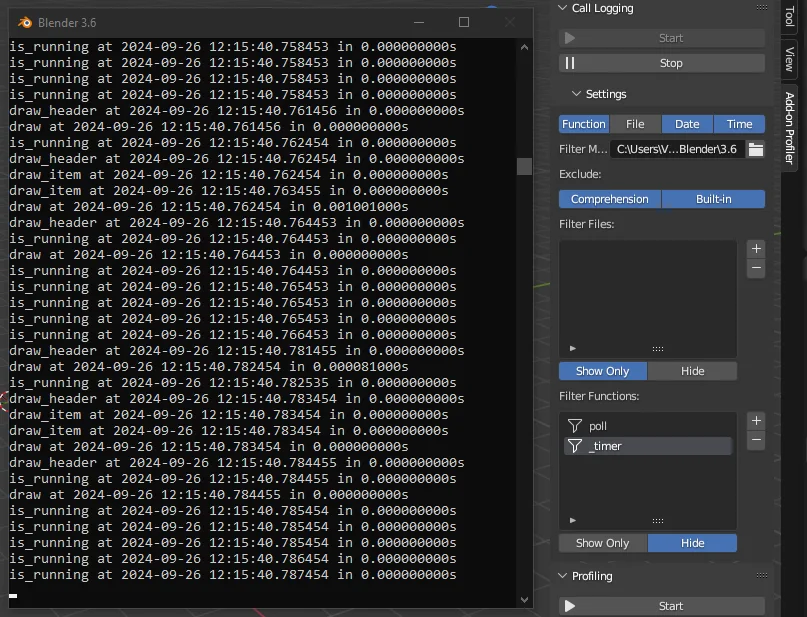
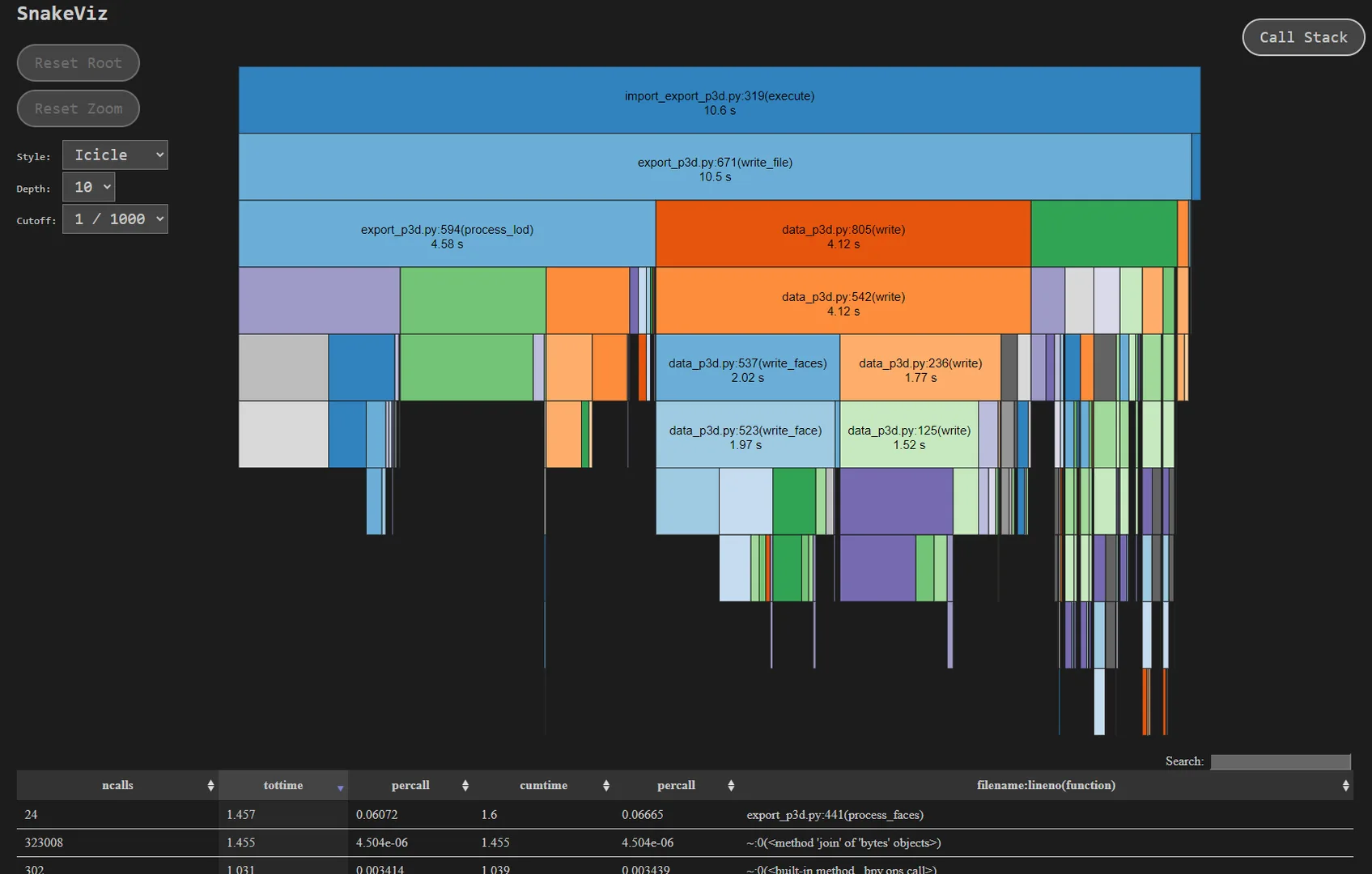
Log and filter Python function calls at runtime Capture profiling data and visualize it locally with the Snakeviz library

Add-on Profiler

This project is a reimplementation of the original Plugin-Profiler add-on created by DB3D and improved by rubenmesserschmidt (Plugin-Profiler).

The original posting can be found on the Blender Developer Forums.

About

Add-on Profiler is a Python utility add-on for Blender, providing a convenient and in-software solution to monitor code execution and capture profiling data when needed during add-on development.

Usage

The two main features of the add-on are execution logging and profiling. The tools can be found on the Add-on Profiler tabs of the 3D viewport sidebar.

Logging

The logging feature makes it possible to monitor all execution calls in the running Python session. The output can be filtered by various options like function names and source files.

By the very nature of this process, the execution is considerably slower, but it makes it possible to catch rampant function calls by inspecting the live logs.

Profiling

The profiling tool utilizes the cProfile and pstats modules to capture profiling data from the execution. The captured data can be formatted and output to the system console, or saved as a profiling data file.

The profiling data (once saved to a file) can be easily visualized with the Snakeviz library. Instructions for the usage of the library can be found in the Snakeviz docs.

Snakeviz has to be installed locally as a separate package.

Installation

This reimplementation is made to be compatible with the new extension system of the Blender 4.2+ releases. Backwards compatibility is known to Blender 2.90.0.

The add-on can be installed from the packaged release like any other add-on. Information on the installation of add-ons can be found in the official Blender Manual.


What's New

2.1.0 October 2nd, 2024

Tested compatibility: Blender 2.90 -> 4.2

Added

  • Filter Time logging option

Permissions

This extension requests the following permission:

  • Files

    Save and process benchmark and profile data

Developer
MrClock
Rating
(1)
Version
2.1.0
Updated
1 y
Published
Sept. 26th, 2024
Downloads
14375
Size
5.3 KB
Compatibility
Blender 4.2 LTS and newer
Website
github.com/MrClock8163/AddonProfiler
Report Issues
github.com/MrClock8163/AddonProfiler/issues
License
GNU General Public License v3.0 or later
Development
...or download and Install from Disk
  • 5.3 KB

Reviews

See all
  • Dan-Gry
  • v2.1.0
  • 1 y

Very useful addon! Thanks :)

5.0

1 review
5
4
3
2
1
Rate this Add-on Report an issue
  • About
  • Privacy Policy
  • Terms of Service
About
  • Blender Foundation
  • Blender Institute
  • Blender Studio
  • License
  • Logo & Trademark
  • Credits
  • Privacy Policy
  • Code of Conduct
Organization
  • People
  • Jobs
Blender Network
Download
  • Latest Blender
  • Blender LTS
  • Previous Versions
  • Experimental Builds
  • Source Code
  • Requirements
  • Benchmark
  • Flamenco
Extensions
  • Add-ons
  • Themes
Developers
  • Get Started
  • Roadmap
  • Projects
  • Docs
  • Blog
  • Forum
  • YouTube
  • Python API
Blender Studio
  • Films
  • Training
  • Tools & Pipeline
Support
  • Manual
  • Community
  • FAQ
Get Involved
  • Documentation
  • Education
News
  • Press Releases
  • User Stories
Blender Conference
Follow Blender
Support Blender
  • Donate
  • One-time Donation
Artistic freedom starts with Blender The Free and Open Source 3D Creation Suite